Anatomy of SystemOptimizer - A BYOVD EDR Killer with a UAC Bypass
In this walkthrough, I analyze a Windows x64 executable named SystemOptimizer.exe. What initially appears to be a relatively small Windows executable turns out to contain an interesting multi-stage defense-evasion mechanism involving PowerShell, a UAC bypass, an embedded kernel driver, and a large list of security products targeted for termination.
The sample analyzed in this walkthrough has the following SHA-256 hash:
1
c8f290d9c109232bb1b40336fd08a871955fffcb907430cd9fc7e89c811bf92b
For the reverse engineering process, I primarily used Ghidra along with Python tooling such as pefile for inspecting and extracting PE resources.
The interesting part of this sample is that most of the native loader itself is relatively straightforward. The more unusual behavior becomes visible after analyzing the two payloads embedded inside the executable’s resource section.
Initial Sample Triage
I started the investigation by performing basic static analysis of SystemOptimizer.exe.
1
2
3
4
5
6
7
8
File:        SystemOptimizer.exe
Size:        95,744 bytes
Format:      PE32+ x64
Subsystem:   GUI
Compiled:    2026-08-29 14:51:14 UTC
Entry Point: 0x140002520
Signature:   None
Manifest:    requestedExecutionLevel = asInvoker
One detail immediately stood out.
The executable contains only around 8 KB of code inside the .text section, while the .rsrc section is approximately 60 KB.
1
2
3
4
5
6
7
.text    0x1F8C
.bss     0x0090
.data    0x4E68
.pdata   0x01F8
.idata   0x113A
.rnd     0x0010
.rsrc    0xEAE8
For a relatively small executable, having such a large resource section is worth investigating because malware loaders commonly embed additional stages inside PE resources.
Inspecting the resource directory confirmed this.
1
2
3
RT_RCDATA / ID 101 / 0x8B50 bytes
RT_RCDATA / ID 102 / 0x5D41 bytes
RT_MANIFEST / ID 1 / 0x017D bytes
Resource 101 appeared to contain another native PE file.
Resource 102, however, appeared as a high-entropy binary blob.
At this point, I suspected that SystemOptimizer.exe was primarily acting as a loader for these two embedded components.
Import Table Analysis
Before moving into the decompiler, I checked the imported Windows APIs.
Several API groups immediately revealed what the executable was capable of doing.
Resource Handling
1
2
3
4
FindResourceA
LoadResource
LockResource
SizeofResource
These APIs indicate that the executable accesses data stored inside its PE resources.
Windows Service Management
1
2
3
4
5
OpenSCManagerA
CreateServiceA
StartServiceA
ControlService
DeleteService
This was particularly interesting because service creation is commonly used to load kernel drivers.
Kernel Communication
1
2
CreateFileW
DeviceIoControl
DeviceIoControl strongly suggested that the executable communicates with a kernel device.
Process Enumeration
1
2
3
CreateToolhelp32Snapshot
Process32FirstW
Process32NextW
This indicates that the executable enumerates processes running on the system.
Network Communication
1
2
3
InternetOpenA
InternetOpenUrlA
InternetReadFile
These APIs indicate that the sample also performs HTTP-based network communication.
At this stage, the combination of:
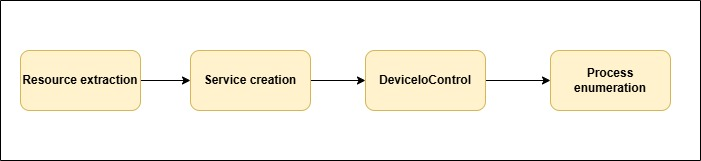
was already a strong indication that the executable extracts a kernel driver, loads it through the Service Control Manager, and then uses that driver to interact with running processes.
The next step was to confirm this behavior through the decompiled code.
Locating the Main Function
The executable entry point at:
1
0x140002520
mostly contains standard Microsoft Visual C++ runtime initialization.
Following the execution flow eventually leads to:
1
FUN_140002210
which contains the actual malware logic.
Simplified, the function behaves like this:
1
2
3
4
5
6
7
8
9
10
11
12
13
14
15
16
17
18
19
20
21
22
23
24
25
26
27
28
29
30
31
32
33
34
HWND hWnd = GetConsoleWindow();

if (hWnd != NULL)
    ShowWindow(hWnd, SW_HIDE);

elevate_via_powershell();

if (check_killdate() != 0) {

    if (drop_driver(drv_path) != 0) {

        if (install_and_start_driver(drv_path) == 0) {

            HANDLE h = CreateFileW(
                L"\\\\.\\SystemOptimizer",
                GENERIC_READ | GENERIC_WRITE,
                0,
                NULL,
                OPEN_EXISTING,
                0,
                NULL
            );

            if (h != INVALID_HANDLE_VALUE) {

                do {
                    kill_pass(h);
                    Sleep(1000);
                }
                while (true);
            }
        }
    }
}
This gives us a good overview of the malware’s execution logic.
The executable first attempts to elevate itself.
Once elevated, it performs a date validation check.
If the date check succeeds, it extracts a driver, installs the driver as a Windows service, opens the driver’s device interface, and continuously enumerates processes.
The process enumeration happens once every second.
Privilege Check and Elevation
The loader contains a function responsible for checking whether the process is already elevated.
The function uses:
1
2
3
OpenProcessToken
GetTokenInformation
TokenElevation
If the process is not elevated, the loader accesses resource 102.
The relevant logic is located inside:
1
FUN_140001f34
The malware retrieves the embedded resource using:
1
2
3
4
5
FindResourceA(
    GetModuleHandleA(NULL),
    MAKEINTRESOURCE(102),
    RT_RCDATA
);
It then obtains the Windows temporary directory using:
1
GetTempPathA
and generates a random 16-character filename using characters from:
1
abcdefghijklmnopqrstuvwxyz0123456789
The resulting file follows this structure:
1
%TEMP%\<16_random_characters>.ps1
However, the embedded resource is not stored as plaintext PowerShell.
Before writing the file, the malware decrypts the resource.
Decrypting Resource 102
Looking at the decryption loop reveals a very simple rolling XOR operation.
1
2
for (i = 0; i < size; i++)
    buf[i] ^= key16[i & 0xF];
The XOR key is stored directly inside the executable at:
1
0x1400087B0
The key is:
1
12 34 56 78 9A BC DE F0 11 22 33 44 55 66 77 88
Since the key is 16 bytes long, each byte of the resource is XORed against the corresponding byte of the key, with the key repeating every 16 bytes.
A small Python script is enough to decrypt it:
1
2
3
4
5
6
7
8
9
10
key = bytes.fromhex(
    "123456789abcdef01122334455667788"
)

decoded = bytes(
    b ^ key[i % 16]
    for i, b in enumerate(resource_102)
)

open("stage.ps1", "wb").write(decoded)
After decrypting the resource, I recovered approximately 23 KB of PowerShell code.
This confirmed that resource 102 is the privilege escalation stage.
PowerShell Execution
After decrypting and writing the PowerShell script to disk, the loader launches it using:
1
powershell.exe
with approximately the following command line:
1
powershell.exe -ExecutionPolicy Bypass -File "<random>.ps1" -E "<SystemOptimizer.exe>"
One detail here is particularly important.
The loader does not use:
1
runas
with ShellExecuteExA.
Instead, it uses:
1
open
This means the executable itself does not request elevation through a normal UAC prompt.
The PowerShell script is responsible for bypassing UAC.
After launching PowerShell, the loader waits approximately one second, deletes the .ps1 file, and terminates itself.
The elevated instance created by the PowerShell stage then continues execution.
Analyzing the PowerShell Stage
The decrypted PowerShell accepts the target executable as a parameter.
Its basic structure looks like this:
1
2
3
4
5
6
7
8
9
10
11
12
13
14
15
16
17
18
19
20
21
22
23
24
param(
    [Alias("E")]
    [string]$TargetExecutable,

    [Alias("A")]
    [string]$ExecutionArguments
)

function Execute-PrivilegeEscalation {

    $infConfigurationContent = @'
        ...
'@

    $csharpImplementationCode = @"
        ...
"@

    ...

    ExecutePrivilegeProcess
}

Execute-PrivilegeEscalation
The PowerShell contains embedded C# code that implements the actual UAC bypass.
The bypass abuses:
1
cmstp.exe
which is a legitimate Microsoft binary.
cmstp.exe UAC Bypass
The script dynamically creates an INF file containing:
1
2
3
4
5
6
7
8
9
10
11
12
13
14
15
[version]
Signature="$WINDOWS NT$"
AdvancedINF=2.0

[DefaultInstall]
DestinationDirs=DefaultDestDir
RunPreSetupCommands=RunPreSetup

[RunPreSetup]
LINE
taskkill /IM cmstp.exe /F

[Strings]
ServiceName="WindowsUpdate"
ShortSvcName="WinUpdate"
The placeholder:
1
LINE
is replaced with the command used to relaunch SystemOptimizer.exe.
The script then launches:
1
C:\Windows\System32\cmstp.exe
using:
1
/au <generated INF file>
The INF file is written under:
1
%LOCALAPPDATA%
with a randomly generated filename.
The important component is:
1
RunPreSetupCommands=RunPreSetup
This causes the command stored inside the RunPreSetup section to execute through the elevated cmstp.exe process.
The malware also attempts to automate the confirmation dialog.
It searches for a window named:
1
WindowsUpdate
using:
1
FindWindow
and sends:
1
2
WM_KEYDOWN
VK_RETURN
using PostMessage.
Effectively, the malware simulates pressing Enter.
Once the command executes, SystemOptimizer.exe is relaunched with high integrity.
The temporary INF file is then deleted.
UAC Environment Checks
Before attempting the bypass, the PowerShell checks the current UAC configuration.
It reads:
1
2
ConsentPromptBehaviorAdmin
PromptOnSecureDesktop
from the Windows UAC policy configuration.
It specifically checks for:
1
2
ConsentPromptBehaviorAdmin = 2
PromptOnSecureDesktop = 1
If this configuration is detected, the malware stops the privilege escalation attempt.
The script also checks whether the current user belongs to:
1
S-1-5-32-544
which corresponds to the local Administrators group.
Therefore, the bypass is intended for situations where the current user is already a member of the Administrators group but the process is running at medium integrity.
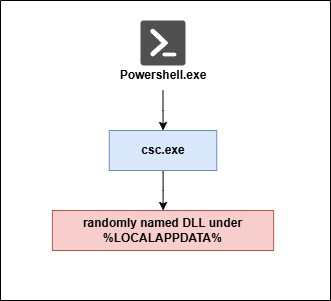
PowerShell C# Compilation Fallback
The PowerShell stage contains another interesting fallback mechanism.
If its normal inline C# compilation fails, it writes the C# source code to:
1
%LOCALAPPDATA%\<random>\<random>.dll.cs
It then invokes the Microsoft C# compiler:
1
C:\Windows\Microsoft.NET\Framework64\v4.0.30319\csc.exe
using approximately:
1
csc.exe /target:library /out:<random>.dll <random>.dll.cs
The resulting DLL is loaded using:
1
Assembly.LoadFrom
After the UAC bypass finishes, the temporary C# source file and DLL are deleted.
This creates another unusual execution relationship:
The PowerShell also contains a CPU-intensive loop involving mathematical operations such as:
1
2
3
Math.Sqrt
Math.Sin
Math.Log
The loop runs for approximately one second before continuing.
This appears intended to introduce execution delay and potentially interfere with heavily instrumented sandbox environments.
The Fake DSP Logic
One of the most interesting parts of this sample appears inside the embedded C#.
Several functions contain Spanish comments describing what appears to be digital signal processing logic.
For example, the code references concepts such as:
1
2
3
4
5
PLL
ADC
IIR
AGC
VCO
Some comments explicitly state that the values are not dates.
There are even references to an:
1
anti-LLM trap
At first glance, the functions look unnecessarily complicated.
However, looking carefully at the arithmetic reveals many expressions such as:
1
x ^ x
1
x - x
and:
1
(x * 1) - x
All of these evaluate to:
1
0
This means much of the apparent complexity is simply arithmetic noise.
The functions operate on the following array:
1
2
3
4
5
6
7
8
9
10
private static readonly int[] _noiseSeed = {
    0x6F,
    0x2A,
    0xC1,
    0x11,
    0x7D,
    0x05,
    0x33,
    0x9E
};
After simplifying the arithmetic, the five main functions return:
1
2
3
4
5
R1() = 2026
S2() = 11
T3() = 10
U4() = 18
V5() = 30
That gives us:
1
2026-11-10 18:30
The code later confirms exactly how these values are used:
1
2
3
4
5
6
7
8
DateTime Y3 = new DateTime(
    AE,
    AF,
    AG,
    AH,
    AI,
    59
);
Therefore, the actual timestamp is:
1
2026-11-10 18:30:59
The supposed DSP calculations are actually an obfuscated kill-date.
Confirming the Hidden Date
There is an even stronger way to validate this.
The malware contains:
1
2
_checksumVector =
3BFBACCDEB39FC49076A729800EA4658ED5B404DF3654388F72C63A580827F84
and:
1
_invariantKey = 179050295821
The code builds:
1
2026:11:10:18:30
and calculates its SHA-256 hash.
We can reproduce the calculation:
1
2
3
4
5
6
7
8
9
import hashlib

value = b"2026:11:10:18:30"

print(
    hashlib.sha256(value)
    .hexdigest()
    .upper()
)
The result is:
1
3BFBACCDEB39FC49076A729800EA4658ED5B404DF3654388F72C63A580827F84
which exactly matches the embedded checksum.
So despite the comments claiming that the arithmetic represents DSP calculations, the malware itself contains cryptographic evidence confirming that the values represent a date.
This is also a useful reverse engineering lesson.
Comments inside malicious code should never automatically be treated as documentation.
They are attacker-controlled data.
The actual instructions and data flow should always be considered the ground truth.
Network-Based Time Validation
Another interesting characteristic is how the malware determines the current time.
Instead of relying entirely on the local Windows clock, it attempts to obtain time from external services.
The native loader checks:
1
https://worldtimeapi.org/api/timezone/Etc/UTC
followed by:
1
https://timeapi.io/api/Time/current/zone?timeZone=UTC
and finally:
1
http://www.google.com
For Google, the malware retrieves the HTTP Date header.
The PowerShell stage performs essentially the same operation.
This makes manipulating the local VM clock less effective when attempting to bypass the malware’s time restrictions during analysis.
Two Different Kill-Dates
Interestingly, the native loader and PowerShell stage do not use the same expiration date.
The native loader contains:
1
2026-10-06 22:05:00
while the PowerShell stage contains:
1
2026-11-10 18:30:59
Therefore, the privilege escalation stage remains valid for several weeks longer than the main payload.
This could indicate that the two components were developed or updated independently and their expiration values were not synchronized.
Extracting Resource 101
After understanding the PowerShell stage, I moved back to resource 101.
Unlike resource 102, this resource is not encrypted.
The loader extracts it directly and writes it to disk.
The output location follows this pattern:
1
%LOCALAPPDATA%\<16_random_characters>\<16_random_characters>.tmp
Despite the .tmp extension, the extracted file is actually a Windows x64 kernel driver.
The extracted file identifies itself as:
1
KSLDriver.sys
Basic information:
1
2
3
4
5
Size:          35,664 bytes
Format:        PE32+ x64
Subsystem:     Native
Timestamp:     2011-09-16 22:25:48 UTC
PDB:           KSLDriver.pdb
One unusual section name immediately stood out:
1
awesome
The driver also contains version metadata claiming:
1
2
3
4
CompanyName:       Microsoft Corporation
FileDescription:   KSLDriver
InternalName:      KSLDriver
OriginalFilename:  KSLDriver.sys
Driver Signature Analysis
The driver contains an Authenticode signature chain associated with Microsoft.
The certificate information includes:
1
2
3
4
Microsoft Corporation
Microsoft Code Signing PCA
Microsoft Root Authority
Microsoft Time-Stamp Service
The timestamp associated with the driver is from:
1
2011-09-16
This is significant because the sample appears designed around an old signed-driver trust scenario.
Rather than simply dropping an unsigned malicious driver, the loader relies on a signed kernel component that can perform privileged process manipulation.
This allows the malicious functionality to move below user mode, where normal process protection mechanisms are much less effective.
Driver Service Installation
Once elevated, the loader opens the Windows Service Control Manager using:
1
OpenSCManagerA
It then checks whether the following device already exists:
1
\\.\SystemOptimizer
If the device is already available, the loader assumes the driver is loaded.
Otherwise, it checks for an existing service named:
1
SystemOptimizer
If an old instance exists, the loader attempts to stop and delete it.
It then creates a new service using:
1
CreateServiceA
with:
1
2
3
ServiceName: SystemOptimizer
ServiceType: SERVICE_KERNEL_DRIVER
StartType:   SERVICE_DEMAND_START
The driver path points to the randomly generated .tmp file under %LOCALAPPDATA%.
Driver Configuration
Before starting the service, the loader modifies:
1
HKLM\SYSTEM\CurrentControlSet\Services\SystemOptimizer
Several values are created.
1
2
3
DeviceName
ImagePath
AllowedProcessName
DeviceName is configured as:
1
SystemOptimizer
ImagePath points to the extracted driver.
The most interesting value is:
1
AllowedProcessName
To obtain this value, the loader dynamically resolves:
1
NtQueryInformationProcess
and calls it using information class:
1
0x1B
which corresponds to:
1
ProcessImageFileName
This returns the loader’s NT-style path, similar to:
1
\Device\HarddiskVolume3\Users\<user>\...\SystemOptimizer.exe
That path is stored as AllowedProcessName.
Later analysis of the driver shows why this is important.
The driver checks the identity of the process communicating with it and restricts access to the configured executable.
So the loader and driver are specifically designed to work together.
Opening the Kernel Device
After starting the service, the loader attempts to open:
1
\\.\SystemOptimizer
using:
1
CreateFileW
The loader retries the operation several times with short delays.
Once the handle is successfully obtained, the malware enters its main process-monitoring loop.
Process Enumeration
The loader continuously enumerates running processes using:
1
2
3
CreateToolhelp32Snapshot
Process32FirstW
Process32NextW
For each process, the executable compares the process name against a hardcoded array.
The array begins around:
1
0x140007A70
and ends immediately before the XOR key stored at:
1
0x1400087B0
Since each pointer occupies eight bytes on x64:
1
(0x87B0 - 0x7A70) / 8
gives:
1
424
Therefore, the malware contains 424 unique process names that it attempts to identify.
If a process matches one of these names, the loader constructs an eight-byte request.
1
2
3
4
struct {
    DWORD command;
    DWORD pid;
}
The command is:
1
8
and the second DWORD contains the target PID.
The request is then sent to the driver using:
1
DeviceIoControl
IOCTL Analysis
The loader communicates with the driver using:
1
0x222044
Decoding the IOCTL gives:
1
2
3
4
DeviceType = 0x22
Function   = 0x811
Method     = METHOD_BUFFERED
Access     = FILE_ANY_ACCESS
Interestingly, the driver only exposes one primary IOCTL.
However, the first DWORD of the input buffer acts as a secondary command identifier.
The driver accepts command values from:
1
0
through:
1
9
giving ten internal operations.
The loader only uses:
1
sub-command 8
with an eight-byte input buffer.
The second DWORD contains the PID.
At first, this looks like a straightforward:
1
terminate PID
operation.
But reversing the sub-command 8 handler revealed something more interesting.
Understanding Sub-Command 8
The handler first retrieves the PID:
1
mov ecx, [rsi+4]
It then opens and references the target process.
The resulting process object is stored in a global location.
However, before replacing the previous value, the driver checks whether another process object was already stored.
If a previous target exists, it passes that previous process object to another function.
That function eventually calls:
1
ZwTerminateProcess
Therefore, sending:
1
PID A
does not immediately terminate PID A.
Instead:
1
2
3
4
5
6
7
8
9
10
Request PID A
    -> store PID A

Request PID B
    -> terminate PID A
    -> store PID B

Request PID C
    -> terminate PID B
    -> store PID C
The termination is effectively delayed by one request.
This means that a single isolated IOCTL request may appear to do nothing during dynamic analysis.
But when the loader continuously enumerates hundreds of processes, this delay becomes practically irrelevant.
Every matching process is eventually terminated as another target is registered.
Kernel Process Termination
The actual termination function obtains the PID using:
1
PsGetProcessId
and opens the process using:
1
ZwOpenProcess
with:
1
PROCESS_ALL_ACCESS
It then calls:
1
ZwTerminateProcess
with the exit status:
1
0xC0000022
which corresponds to:
1
STATUS_ACCESS_DENIED
This is particularly important from a forensic perspective.
A security agent terminated by this mechanism may exit with:
1
0xC0000022
without a normal user-mode TerminateProcess operation explaining why the process died.
The actual termination occurs from kernel mode.
AllowedProcessName Enforcement
The driver also contains logic that mirrors the loader’s use of:
1
NtQueryInformationProcess
with:
1
ProcessImageFileName
The driver retrieves the image path of the process communicating with it and compares that value against:
1
AllowedProcessName
stored under the service registry key.
Therefore, another arbitrary process cannot simply open the device and reuse the driver’s process-killing functionality.
The communicating executable must match the path configured by the loader.
This strongly indicates that KSLDriver.sys was designed specifically to operate with this loader rather than being a completely unrelated vulnerable driver.
Security Products Targeted
The hardcoded process list contains 424 unique entries.
The coverage is extensive.
EDR and XDR Products
The list contains process names associated with products from vendors including:
1
2
3
4
5
6
7
8
9
10
11
12
13
14
15
16
17
18
19
20
21
22
23
24
25
26
27
CrowdStrike
SentinelOne
Palo Alto Cortex XDR
Microsoft Defender for Endpoint
Carbon Black
Cybereason
Elastic
Sophos
Huntress
ThreatLocker
Deep Instinct
Morphisec
Tanium
Cisco Secure Endpoint
FireEye
Trellix
Cylance
Trend Micro
Bitdefender
Kaspersky
ESET
McAfee
Symantec
Fortinet
F-Secure
Webroot
Malwarebytes
For example, Cortex-related entries include:
1
2
3
4
5
6
CortexXDR
cytray
CyveraService
CyvrFsFlt
Traps
trapsd
CrowdStrike-related entries include:
1
2
3
4
5
CSFalconService
CSFalconContainer
csagent
falconhost
CSFalconSystemService
SentinelOne-related entries include:
1
2
3
4
SentinelAgent
SentinelStaticEngine
SentinelHelperService
SentinelCtl
Logging and Monitoring Products
The malware does not stop with EDR products.
It also targets logging and monitoring agents.
Examples include:
1
2
3
4
5
6
7
8
9
10
11
Sysmon.exe
Sysmon64.exe
splunkd.exe
splunk-winevtlog.exe
splunk-netmon.exe
WinCollect.exe
osqueryd.exe
AlienVaultAgent.exe
LogRhythmAgent.exe
rpcapd.exe
MonitoringHost.exe
This is a particularly important observation.
If the objective were simply to disable antivirus scanning before executing another payload, targeting EDR processes might be sufficient.
Instead, the malware also attempts to terminate telemetry and log-forwarding components.
This can significantly reduce visibility from the affected endpoint.
Additional Security Tool Coverage
The target list also contains processes associated with:
1
2
3
4
5
6
7
8
Darktrace
Vectra
ExtraHop
Digital Guardian
Code42
Teramind
Absolute
Acronis
There are also processes associated with virtualization, VPN software, remote-access tooling, and several regional antivirus products.
The breadth of the list shows that the developer intentionally attempted to support a wide range of enterprise security environments.
Cleanup Behavior
The loader contains functionality for removing the driver service and deleting the dropped driver.
The service cleanup routine performs:
1
2
3
4
OpenSCManagerA
OpenServiceA
ControlService
DeleteService
The file cleanup routine deletes:
1
%LOCALAPPDATA%\<random>\<random>.tmp
and then removes the parent directory.
However, there is an important problem with this cleanup logic.
On successful execution, the malware enters:
1
2
3
4
5
do {
    kill_pass(h);
    Sleep(1000);
}
while (true);
This loop never exits.
Therefore, the cleanup code is primarily reachable through failure paths.
During successful operation, the following artifacts can remain on the system:
1
2
3
4
SystemOptimizer service
KSLDriver driver file
random LOCALAPPDATA directory
SystemOptimizer registry configuration
The PowerShell and INF files are much more transient because the malware explicitly deletes them shortly after execution.
The .rnd Section
One final unusual artifact is the PE section named:
1
.rnd
A static initialization routine writes the value returned by:
1
GetTickCount64()
into this section at runtime.
The section is only 16 bytes.
Nothing else appears to read the value afterward.
Initially, this could look like an attempt to introduce randomness into the executable.
However, because the modification happens only in memory at runtime, it does not modify the executable stored on disk and therefore does not change the file hash.
It appears to be either an unused development artifact or a small build-time gimmick rather than an important part of the malware’s functionality.
Conclusion
SystemOptimizer.exe is a compact loader whose primary objective is to obtain elevated privileges and gain kernel-level control over security processes.
The first stage extracts an XOR-encrypted PowerShell payload from resource 102.
That PowerShell stage uses cmstp.exe and a generated INF file to bypass UAC and relaunch the original executable at high integrity.
The script also contains deliberately misleading arithmetic and comments describing DSP, PLL, ADC, AGC, and VCO calculations. Simplifying those calculations reveals that they actually construct the date:
1
2026-11-10 18:30:59
The embedded SHA-256 checksum confirms this value.
Once elevated, the loader performs another network-backed time check before extracting resource 101.
Resource 101 contains KSLDriver.sys, which is written to a randomly generated .tmp file under %LOCALAPPDATA% and registered as the SystemOptimizer kernel-driver service.
The loader then communicates with:
1
\\.\SystemOptimizer
through:
1
DeviceIoControl
using IOCTL:
1
0x222044
The loader continuously enumerates the system process table and compares every process against a hardcoded list containing 424 security-related process names.
Matching PIDs are sent to the driver using sub-command 8.
Reverse engineering the driver shows that the termination mechanism is intentionally indirect. Each request registers a new target while terminating the previously registered process through ZwTerminateProcess.
The termination occurs from kernel mode with:
1
0xC0000022
as the process exit status.
The target list includes not only major EDR and antivirus products but also Sysmon, Splunk, WinCollect, osquery, network monitoring products, DLP agents, and other telemetry components.
That distinction matters.
The sample is not simply attempting to disable one antivirus product. Its process list is designed to remove multiple layers of endpoint security and monitoring visibility simultaneously.
From a reverse engineering perspective, the sample is also a useful reminder that attacker-controlled comments cannot be trusted. The PowerShell stage deliberately attempts to influence the analyst’s interpretation of its arithmetic by describing a date calculation as signal-processing logic.
The instructions tell the truth.
The comments do not.